Wiring servers into Claude Code
One command, three decisions
Claude Code adds MCP servers with claude mcp add. The command is short, which hides the fact that it is making three decisions at once: which transport, which scope, and how secrets reach the server. Each has a default, and each default is wrong for somebody.
Start with the two shapes it takes. A remote server over HTTP needs a URL:
claude mcp add --transport http notion https://mcp.notion.com/mcpA local server needs a command to run:
claude mcp add --transport stdio atrium -- uv run server.pyThe bare -- is an airlock
That -- is not decoration. It separates Claude Code's own flags from the command line belonging to your server, and everything after it is passed through untouched.
For anyone who has written a CLI, this is the standard getopt convention and needs no further explanation. For everyone else: without it, a flag intended for your server would be eaten by Claude Code, and a flag Claude Code recognises would be stolen from your server. The airlock keeps two command lines from mixing.
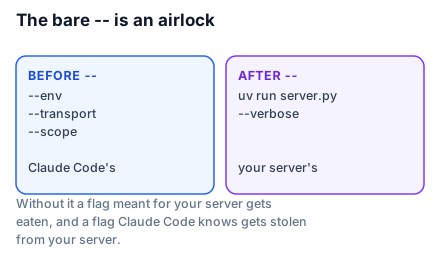
It matters the moment your server takes arguments of its own:
claude mcp add --env ATRIUM_DB=/Users/you/atrium.db --transport stdio atrium -- uv run server.py --verbose--env is Claude Code's. --verbose is the server's. The -- is what makes that unambiguous.
Use absolute paths. A stdio server is launched by the client, and its working directory is undefined — on macOS it is often /. A relative path that works when you test it by hand will fail when Claude Code launches it, and the error will not mention paths. This is the single most common cause of a server that "works in the Inspector but not in my client".
Scope: who else gets this server
--scope decides where the configuration is written, and therefore who else gets it.
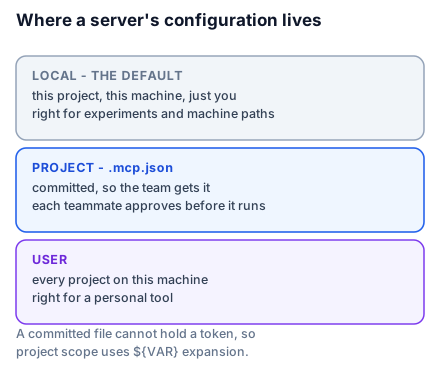
local(the default) — this project, this machine, just you. Right for a server you are experimenting with, and for anything with a machine-specific path.project— written to.mcp.jsonin the project root, intended to be committed. Right for a server the whole team needs. Claude Code prompts each teammate for approval before running it, because a config file in a repository is a code-execution vector.user— available to you across every project on this machine. Right for a personal tool like a notes server that has nothing to do with any one codebase.
claude mcp add --transport http --scope project shared-tracker https://tracker.example.com/mcpThe resulting .mcp.json is plain and reviewable:
{
  "mcpServers": {
    "shared-tracker": {
      "type": "http",
      "url": "https://tracker.example.com/mcp"
    }
  }
}
Secrets, without committing them
A project-scoped file is committed, so a token cannot be written into it. Claude Code expands environment variables in .mcp.json, including a default form:
{
  "mcpServers": {
    "atrium": {
      "type": "stdio",
      "command": "uv",
      "args": ["run", "server.py"],
      "env": {
        "ATRIUM_DB": "${ATRIUM_DB:-./atrium.db}",
        "ATRIUM_TOKEN": "${ATRIUM_TOKEN}"
      }
    }
  }
}
${ATRIUM_DB:-./atrium.db} uses the variable if set and falls back otherwise. ${ATRIUM_TOKEN} has no fallback, so it must come from the developer's own environment — which is the correct arrangement for a credential.
The env key is also how you fix a server that cannot see something it needs. Servers launched over stdio inherit only a limited subset of environment variables, and which subset is platform-dependent, so a server that works in your shell may not work when launched by a client. Naming the variable explicitly in env removes the guesswork.
Checking it worked
claude mcp listThe output carries a health status per server: Connected, Needs authentication, or Failed to connect. A failure status means Claude Code could not reach that server, not that the command failed — a distinction worth internalising before you go looking for a bug in the wrong place.
Inside a session, /mcp opens a panel showing each connected server, its tool count, and whether it needs authentication. That panel is also where OAuth happens: a remote server requiring authorization shows there, and selecting it starts the flow in your browser.
Two more things /mcp gives you. It flags a server that advertises tools but exposes none, which is usually a server that started but failed to load its configuration. And it lets you toggle a server off without deleting it, which is the right move when you are narrowing down which server is causing a problem.
What to take into the next lesson
claude mcp add picks a transport, a scope and a secrets story in one line; the bare -- separates Claude's flags from your server's; absolute paths are mandatory because a stdio server's working directory is undefined; and .mcp.json at project scope is committed, so credentials go through ${VAR} expansion rather than into the file. Next: the same server described four different ways.