Building an MCP client in Python
You probably do not need one
Most people who set out to write an MCP client should not. If you want to use servers, a host already exists — Claude Code, Claude Desktop, an IDE — and it does the model integration, the approval UI, the OAuth flows and the error handling for you.
Three cases where writing one is genuinely right:
- You are building an AI product. Your application has its own model loop and needs to consume servers. You are writing a host, and a client is part of it.
- You are automating. A script, a CI job, a batch process that calls tools without a model in the loop at all. This is the underrated one — MCP is a perfectly good RPC protocol, and
--clifrom Lesson 8 is exactly this. - You are testing. Which you have been doing since Lesson 14.
Writing your own browser
Occasionally the right call, usually a sign you wanted something else. The reason it is a useful frame is that it names the actual cost: not the fetching, which is easy, but everything around it — session handling, credentials, rendering, and the hundred behaviours users expect because every other browser has them.
An MCP host is the same shape. The Client is the easy part. The model loop, the approval prompts, the token storage, the elicitation UI and the task polling are the browser.
Three ways to connect
from mcp import Client, StdioServerParameters
from mcp.client.stdio import stdio_client

# In-memory: a server object in this process. Testing.
async with Client(mcp) as client:
    ...

# HTTP: a remote server.
async with Client("http://127.0.0.1:8000/mcp") as client:
    ...

# stdio: launch a server as a subprocess.
server = StdioServerParameters(
    command="uv",
    args=["--directory", "/Users/you/code/atrium", "run", "server.py"],
    env={"ATRIUM_DB": "/Users/you/code/atrium/atrium.db"},
)
async with Client(stdio_client(server)) as client:
    ...
StdioServerParameters is configuration, not a connection. stdio_client() turns it into a transport, and Client opens it when you enter the async with.
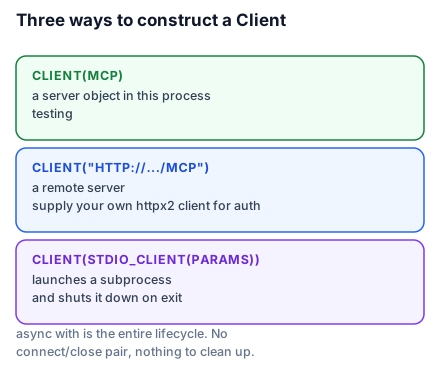
That async with is the entire connection lifecycle. Entering it connects — and for stdio, launches the subprocess. Leaving it disconnects and shuts the subprocess down. There is no connect()/close() pair and nothing to clean up by hand.
Owning the HTTP session
The plain URL form is fine until you need timeouts, retries, a proxy or an auth header. Then supply your own client:
import httpx2
from mcp import Client
from mcp.client.streamable_http import streamable_http_client

async with httpx2.AsyncClient(
    headers={"Authorization": f"Bearer {token}"},
    timeout=httpx2.Timeout(30.0, read=300.0),
    follow_redirects=False,
) as http:
    transport = streamable_http_client("https://atrium.example/mcp", http_client=http)
    async with Client(transport) as client:
        ...
Two details worth setting deliberately. The read timeout is long because a tool call can legitimately take minutes — but the connect timeout stays short, because a server that will not accept a connection is not going to. And follow_redirects=False is the right default here for the SSRF reasons in Lesson 32: validate each hop rather than letting the HTTP client chase them.
If you have read an older tutorial, this is httpx; SDK v2 moved to httpx2, so an httpx.AsyncClient will not satisfy the parameter and the type error is confusing if you have not seen the rename.
Calling things
tools = await client.list_tools()
for tool in tools.tools:
    print(tool.name, "-", tool.description)

result = await client.call_tool("find_slots", {"room_id": "studio-b", "day": "2026-09-17"})

if result.is_error:
    print("failed:", result.content[0].text)
else:
    for slot in result.structured_content["result"]:
        print(slot["start"])
Three habits worth forming immediately.
Check is_error on every call. A domain failure does not raise — it comes back as a result. Code that ignores the flag treats "that room is booked" as success.
Read structured_content, not content. The text blocks are for the model.
Narrow content blocks before reading .text. content is a list of blocks of varying types:
from mcp.types import TextContent

text = "\n".join(b.text for b in result.content if isinstance(b, TextContent))
Pagination
Long lists come back in pages:
tools, cursor = [], None
while True:
    page = await client.list_tools(cursor=cursor)
    tools.extend(page.tools)
    cursor = page.next_cursor
    if cursor is None:
        break
If you have read an older tutorial, this field was nextCursor; it is next_cursor now, along with every other field renamed to snake_case in v2. Servers with a handful of tools return everything in one page, which is exactly why this bug ships — it works in development and truncates in production.
A client with a model in it
The minimum host: fetch tools, hand them to a model, execute what it asks for, feed results back.
tool_list = await client.list_tools()
tools = [
    {"name": t.name, "description": t.description, "input_schema": t.input_schema}
    for t in tool_list.tools
]

messages = [{"role": "user", "content": "Is Studio B free on the 17th?"}]
response = anthropic.messages.create(model=MODEL, max_tokens=1024, messages=messages, tools=tools)

results = []
for block in response.content:
    if block.type == "tool_use":
        outcome = await client.call_tool(block.name, block.input)
        results.append({
            "type": "tool_result",
            "tool_use_id": block.id,
            "content": "\n".join(b.text for b in outcome.content if isinstance(b, TextContent)),
            "is_error": outcome.is_error,
        })

if results:
    messages.append({"role": "assistant", "content": response.content})
    messages.append({"role": "user", "content": results})
    response = anthropic.messages.create(model=MODEL, max_tokens=1024, messages=messages, tools=tools)
tool.input_schema goes straight into the API's input_schema — MCP's schema is JSON Schema and so is the model provider's, which is why this glue is short.
Passing is_error through is what makes the loop work. A failed tool does not end the turn; the model reads the error and tries something else. Swallow it and the model believes the call succeeded.
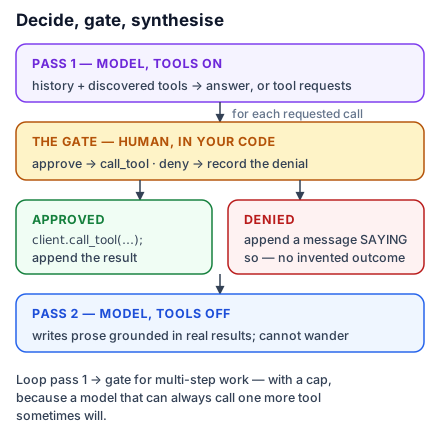
What this sketch omits is the browser: approval prompts before destructive tools, elicitation handling, task polling, multi-turn looping, and token storage. That is the real work.
What to take into the next lesson
Client takes a server object, a URL or a stdio transport, and async with is the whole lifecycle; supply your own httpx2 client when you need timeouts or auth; check is_error, read structured_content, follow next_cursor; and a model loop is short because MCP schemas are already JSON Schema. Next: what separates a demo from something you can leave running.