MCP Apps II: making the grid do something
The interface is a client
A grid you can only look at is a picture. The reason to build one is that a user can point at a free cell and book it — and that means the interface has to call back into your server.
It does so through a small API. This is the one place in this course where the code is not Python, and it cannot be: the interface runs in the host's browser, inside the sandbox, and no amount of Python changes where it executes. Everything on the server side stays Python.
import { App } from "@modelcontextprotocol/ext-apps";

const app = new App({ name: "Atrium availability", version: "1.0.0" });
await app.connect();

app.ontoolresult = (result) => {
  renderGrid(result.structuredContent);
};

document.querySelector("#grid").addEventListener("click", async (event) => {
  const cell = event.target.closest("[data-room][data-hour]");
  if (!cell || cell.dataset.booked === "true") return;

  cell.classList.add("pending");
  const result = await app.callServerTool({
    name: "book_room",
    arguments: {
      day: cell.dataset.day,
      hour: Number(cell.dataset.hour),
      room_hint: cell.dataset.room,
    },
  });
  cell.classList.remove("pending");
  markBooked(cell, result.structuredContent);
});
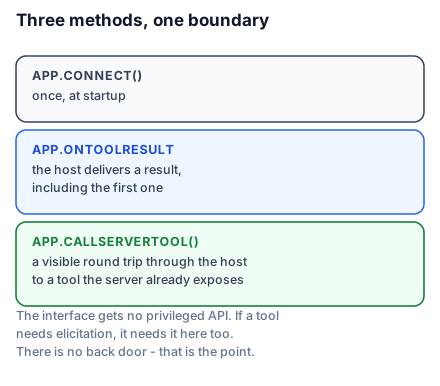
Three methods carry the whole interaction.
app.connect()establishes the channel to the host. Call it once, at startup, before anything else.app.ontoolresultfires when the host delivers a tool result — including the first one, which is what populates the grid when it opens.app.callServerTool()calls a tool on your server and returns its result.
A display case with a service bell
The case from the last lesson gets a bell. A customer can ring for something specific — a size, a colour, that one in the window — and a member of staff fetches it. What the customer still cannot do is walk behind the counter.
That is callServerTool precisely, and the boundary it respects is worth stating for both audiences. A beginner sees that the interface can ask for things but not take them. An engineer sees that every capability the interface has is a tool the server already exposed to the model — the interface gets no privileged API. If book_room requires elicitation, it requires it from the interface too. There is no back door, and that is the security property that makes the sandbox meaningful.
Latency is visible now
callServerTool is a network round trip, through the host, to your server. It is not a local function call, and on a remote server it is a real one.
The click handler above adds a pending class before the call and removes it after, which is the minimum. Anything that mutates state should also be disabled while in flight — a user who clicks a free cell twice while waiting will otherwise send two bookings, and the second will fail with "already booked" for a booking they made themselves a moment ago.
This is ordinary front-end discipline. It is worth naming only because the round trip is invisible in the source and people forget it is there.
Telling the model what happened
A user who books a room by clicking has done something the model cannot see. The conversation carries on with a stale picture of the week unless you say otherwise.
The App class exposes a way to write structured context back to the model, and using it is what keeps the two halves of the interaction coherent. Send a short factual statement — that a booking was made, for which room and hour — rather than a dump of the new grid. The model needs to know the world changed; it does not need the pixels.
Skipping this produces a specific, confusing bug: the user books a room in the interface, then asks "is Studio B free at ten?", and the model says yes because nothing told it otherwise.
What the CSP will break
Predictably, in this order:
- A CDN script tag. Bundle it.
- A web font from Google Fonts. Use system fonts, or embed the font as a data URI.
- A remote image. Inline it.
- A
fetchto your own API. UsecallServerTool— which is the point. Your interface talks to your server through the host, so the host can see and mediate what is happening. A directfetchwould bypass exactly the boundary the sandbox exists to enforce.
The single-file build handles the first three. The fourth is a design correction, not a build setting: if your interface needs data, expose a tool for it.
Testing it
The extension repository ships a basic host for development, which renders your interface without needing a full AI application:
git clone https://github.com/modelcontextprotocol/ext-apps.git
cd ext-apps/examples/basic-host && npm install
SERVERS='["http://localhost:3001/mcp"]' npm start
Point it at your server and call the tool. You get the render, the click handling and the round trips, with none of the model in the way — which is the right loop for building an interface, because you are debugging layout and events rather than prompting.
For an end-to-end test in a real host, a tunnel exposes your local server to something that can reach it. That is worth doing once before shipping, and not for every change.
What to take into the next lesson
connect, ontoolresult and callServerTool are the whole interface API; the interface gets no privileged access, only the tools your server already exposes; every action is a visible round trip that needs a pending state; and telling the model what the user did is what stops the conversation going stale. Next: the same server, serving many people over HTTP.