Going remote
The same code, served differently
Atrium Works has members, and a booking that exists only on one laptop is not a booking. The server needs to run somewhere everyone can reach.
The server code does not change. Only how it is run:
app = mcp.streamable_http_app()uvicorn server:app --host 127.0.0.1 --port 8000That is a Starlette application with the MCP endpoint at /mcp, so clients connect to http://127.0.0.1:8000/mcp. Every tool, resource and prompt you wrote works unchanged, because transport and protocol were separate all along.
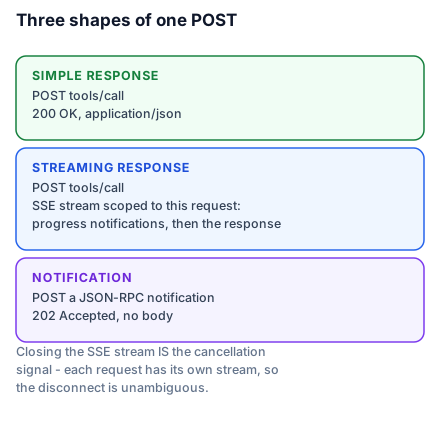
claude mcp add --transport http atrium http://127.0.0.1:8000/mcpMounting it inside an application you already have
Most real deployments already have a web application, and the MCP endpoint should live inside it rather than beside it — same domain, same authentication middleware, same deployment.
from contextlib import asynccontextmanager
from collections.abc import AsyncIterator
from starlette.applications import Starlette
from starlette.routing import Mount

@asynccontextmanager
async def lifespan(app: Starlette) -> AsyncIterator[None]:
    async with mcp.session_manager.run():
        yield

app = Starlette(
    routes=[Mount("/", app=mcp.streamable_http_app())],
    lifespan=lifespan,
)
That lifespan is not optional, and it is the one trap in this lesson.
Subletting a room in a building you do not manage
You rent a room inside someone else's building. Your key opens your door. It does not open the front door — the caretaker does that, every morning, and if they do not, your key is irrelevant because nobody can get to your door.
A mounted sub-application's lifespan never runs. Starlette only runs the lifespan of the outermost application. Mount an MCP app without entering mcp.session_manager.run() in the host's own lifespan and the endpoint exists, accepts connections, and fails on every request — because the session manager that services them was never started.
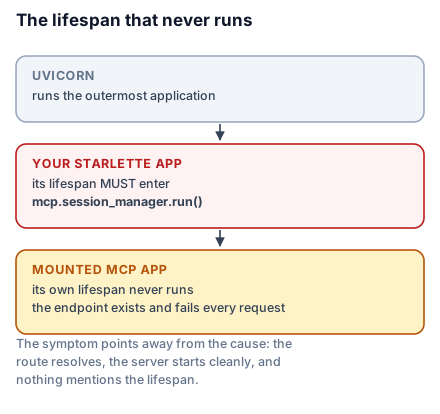
The failure is worth recognising because the symptom points away from the cause. The route resolves. The server starts cleanly. Requests arrive and error. Nothing says "lifespan", and you will look at your tools before you look at your mount. For a beginner: the building was never unlocked. For anyone who has mounted an ASGI sub-app before, this is the familiar sub-application lifespan problem, and the fix is the familiar one — hoist it into the parent.
Two servers in one application follow the same rule, each entered explicitly:
from contextlib import AsyncExitStack

@asynccontextmanager
async def lifespan(app: Starlette) -> AsyncIterator[None]:
    async with AsyncExitStack() as stack:
        await stack.enter_async_context(atrium.session_manager.run())
        await stack.enter_async_context(billing.session_manager.run())
        yield

app = Starlette(
    routes=[Mount("/atrium", app=atrium.streamable_http_app()),
            Mount("/billing", app=billing.streamable_http_app())],
    lifespan=lifespan,
)
Endpoints land at /atrium/mcp and /billing/mcp. If you want /atrium itself to be the endpoint, pass streamable_http_path="/" when building the sub-app.
Health checks
from starlette.requests import Request
from starlette.responses import JSONResponse

@mcp.custom_route("/health", methods=["GET"])
async def health(request: Request) -> JSONResponse:
    return JSONResponse({"status": "ok"})
Custom routes are never authenticated. That is deliberate — a load balancer cannot present a token — and it has one consequence you must respect: a custom route must contain nothing worth knowing. Return liveness. Do not return version numbers, configuration, connected users, queue depths or anything else you would not put on a public page, because that is what it is.
Checking a real database connection here is usually a mistake too. A health check that fails when the database blips takes your server out of rotation for a problem it cannot fix by restarting.
What changes about your server
Nothing in the handlers, but three things around them.
Concurrency is real. Many clients now hit one process. Lifespan state is shared across concurrent requests, so it must be safe for that — and remember synchronous handlers run on worker threads.
Statelessness pays off here. Because the protocol carries what it needs per request, you can run several instances behind an ordinary load balancer with no sticky sessions. This is precisely what Lesson 5's deletions bought.
There is no inherited security boundary. stdio gave you the operating system's process and file permissions for free. HTTP gives you nothing. The next two lessons are about building what you just lost.
What to take into the next lesson
streamable_http_app() serves the same server over HTTP at /mcp; mounting it inside an existing application requires the host's own lifespan to enter session_manager.run(), because a mounted sub-app's lifespan never runs; custom routes are unauthenticated and must stay boring. Next: the boundary you now have to build.