The GitHub MCP server, in anger
The best-known server is also the best available lesson
GitHub publishes an official MCP server, and it is worth a lesson for two reasons. It is the server you are most likely to actually use. And it is a well-made production server you can read for free, which makes it the best available specimen of how a large tool surface gets organised.
It comes in two forms, and the choice is the local-versus-remote decision from Lesson 7 in concrete terms.
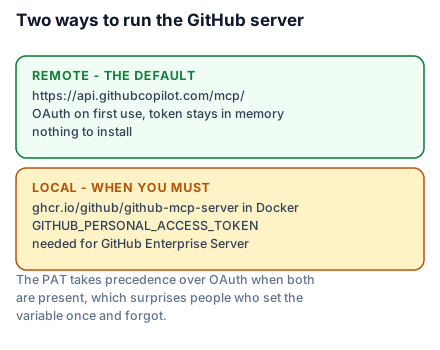
Remote, hosted by GitHub, no installation:
claude mcp add --transport http github https://api.githubcopilot.com/mcp/On github.com you do not create anything up front — the first use runs an OAuth flow in your browser, and the token stays in memory. This is the right default for almost everybody.
Local, running in Docker with a personal access token:
{
  "mcpServers": {
    "github": {
      "command": "docker",
      "args": ["run", "-i", "--rm", "-e", "GITHUB_PERSONAL_ACCESS_TOKEN", "ghcr.io/github/github-mcp-server"],
      "env": {"GITHUB_PERSONAL_ACCESS_TOKEN": "${GITHUB_PAT}"}
    }
  }
}
You need the local form for GitHub Enterprise Server, or when your host does not support remote servers. Note that GITHUB_PERSONAL_ACCESS_TOKEN takes precedence over OAuth when both are present, which is occasionally a surprise if you set the variable once and forgot.
A building pass encoded with only the doors you need
A large office issues one pass per person, and the pass opens the doors that person's job requires. Not every door, because the cost of a lost pass should be proportionate, and not one pass per door, because nobody can carry forty passes.
GitHub's server implements exactly this through toolsets — named groups you enable or disable. The defaults are context, repos, issues, pull_requests and users. Beyond them sit actions, code_security, code_quality, dependabot, discussions, gists, git, labels, notifications, orgs, projects, security_advisories and stargazers.
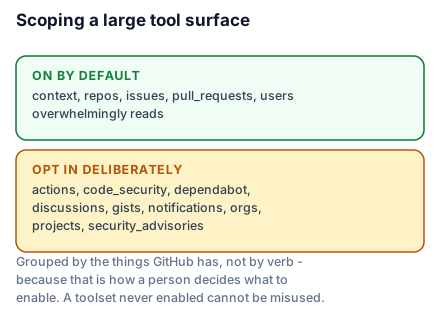
Both audiences get something from the analogy. A beginner takes away that you turn on what you need. An engineer reads it as capability scoping and immediately connects it to two things they already care about: Cursor's forty-tool ceiling from the last lesson, and least privilege from Lesson 13 — because a toolset you never enabled is a tool that cannot be misused, whether by a confused model or a malicious instruction hidden in an issue body.
The default five are a deliberate, defensible choice. They cover reading code, filing and reading issues, and working with pull requests — which is most of what anyone wants — while leaving out everything that could delete, deploy or disclose. If you want CI logs, turn on actions knowingly.
Reading it as a specimen
Point the Inspector at it and read the tool list:
npx @modelcontextprotocol/inspector --cli --server-url https://api.githubcopilot.com/mcp/ \
  --transport http --method tools/list --format json | jq '.tools[] | {name, description}'
Three things are worth noticing, because each is a decision you will face in Lesson 15.
Names are namespaced and specific. Not search, but names that say what is being searched. When forty tools from six servers land in one list, a generic name is one the model picks by accident.
Descriptions say when, not just what. The useful ones read like guidance to a new colleague — what this is for, and when to reach for something else instead. That is the shape to copy.
Parameters carry their own descriptions, and the enumerated ones are enumerated rather than described in prose. A parameter that can be one of four values should say so in the schema, where it can be validated, not in the description, where it can only be hoped for.
What it is actually good at
Two patterns are worth stealing outright.
The read-heavy default. The tools that are on by default are overwhelmingly reads. Writes exist but sit behind toolsets you enable deliberately. That maps directly onto the annotation hints in Lesson 17, and it is a good instinct: make the safe surface the default surface.
Grouping by system, not by verb. The toolsets are issues, repos, actions — the things GitHub has — not create, read, update. That matches how a person decides what to enable, because they think "I want the agent to see CI", not "I want the agent to be able to create things".
What to take into the next lesson
The GitHub server ships remote-with-OAuth and local-with-a-PAT, groups a large surface into toolsets with a deliberately read-heavy default, and writes descriptions that say when to use a tool rather than only what it does. Read it before designing your own. Next: the rest of the shelf, and how to judge a server in five minutes.