Hardening the transport
Your local server is reachable from any web page
Run an MCP server on localhost:8000 and it feels private. It is not.
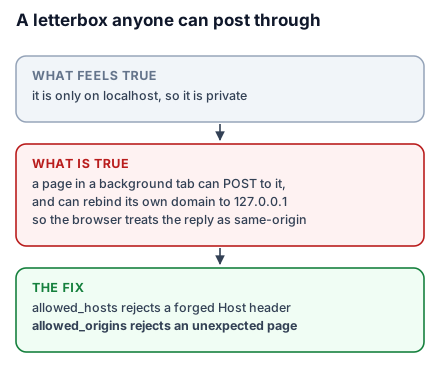
A web page the user visits can make requests to localhost. The browser's same-origin policy governs what JavaScript may read, not what it may send, and a page can also resolve its own domain to 127.0.0.1 — DNS rebinding — after which the browser considers the request same-origin and hands over the response.
So a page in a background tab can enumerate your tools and call them. On a server with your filesystem, your database or your bookings, that is the whole problem.
The letterbox any passer-by can post through
Fitting a letterbox is not an invitation. You made a slot in the door because you wanted post, and now anyone walking past can put anything through it. The slot does not check who is posting.
A listening port is that slot. For a beginner it explains why "it's only on my machine" is not a security property. For an engineer it is the browser-as-confused-deputy problem, and it predicts the right defence: since you cannot control who posts, check what arrives — specifically, where it claims to have come from.
Origin and host validation
from mcp.server.transport_security import TransportSecuritySettings

security = TransportSecuritySettings(
    allowed_hosts=["127.0.0.1:8000", "localhost:8000"],
    allowed_origins=["https://atrium.example"],
)

app = mcp.streamable_http_app(transport_security=security)
allowed_hosts rejects requests whose Host header is not one you expect, which is what closes DNS rebinding — the rebound request arrives claiming the attacker's hostname. allowed_origins rejects browser requests from pages you did not authorise.
Set these on any HTTP server, including a local one. Especially a local one: a production server behind a proxy usually has something else checking hosts, while a development server on localhost typically has nothing at all and is sitting on the machine with all the interesting files.
For a browser-based client you also need CORS, and the header list is not the usual one:
from starlette.middleware import Middleware
from starlette.middleware.cors import CORSMiddleware

app = Starlette(
    routes=[Mount("/", app=mcp.streamable_http_app(transport_security=security))],
    middleware=[
        Middleware(
            CORSMiddleware,
            allow_origins=["https://atrium.example"],
            allow_methods=["GET", "POST", "DELETE"],
            allow_headers=["Authorization", "Content-Type",
                           "MCP-Protocol-Version", "Mcp-Method", "Mcp-Name"],
        )
    ],
    lifespan=lifespan,
)
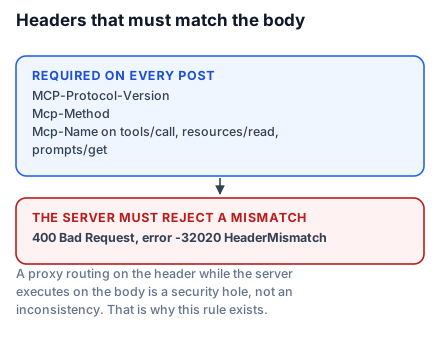
The Mcp-* headers are MCP's own and a default CORS configuration will strip them, producing failures that look like protocol bugs. Three of them are required on every POST — MCP-Protocol-Version, Mcp-Method, and Mcp-Name on tools/call, resources/read and prompts/get. They mirror values already in the body so that load balancers and gateways can route without parsing it, and a server that processes the body must reject any request where a header disagrees with it, returning 400 and error -32020 (HeaderMismatch). That rule exists because a proxy routing on the header while the server executes on the body is a security hole, not an inconsistency.
If you have read an older tutorial, you may see Mcp-Session-Id and Last-Event-ID in a header list like this one. Both are gone: 2026-07-28 removed protocol-level sessions and made SSE streams non-resumable, so there is no session id to echo and no event id to resume from. It also removed the standalone GET stream — a server that only speaks this revision answers GET or DELETE on the MCP endpoint with 405.
*Never `allow_origins=[""]` on a server with real capabilities.** A wildcard means every page on the internet, which is the letterbox with the door removed.
Bind to the right interface
uvicorn server:app --host 127.0.0.1 --port 8000127.0.0.1 accepts only local connections. 0.0.0.0 accepts from anywhere on the network — every device on the café wifi included. That is correct for a container behind a load balancer and wrong for a laptop, and the flag is easy to copy from the wrong tutorial.
Checking it actually holds
Configuration you have not tested is configuration you hope is right. Both checks are one command.
A request with a forged Host header should be refused:
curl -s -o /dev/null -w '%{http_code}\n' -X POST http://127.0.0.1:8000/mcp \
  -H 'Host: attacker.example' -H 'Content-Type: application/json' \
  -d '{"jsonrpc":"2.0","id":1,"method":"tools/list","params":{}}'
And a request claiming an origin you never allowed:
curl -s -o /dev/null -w '%{http_code}\n' -X POST http://127.0.0.1:8000/mcp \
  -H 'Origin: https://evil.example' -H 'Content-Type: application/json' \
  -d '{"jsonrpc":"2.0","id":1,"method":"tools/list","params":{}}'
Both should be rejected. If either returns your tool list, TransportSecuritySettings is not doing what you think — usually because it was passed to the wrong call, or because a proxy in front is rewriting Host before your server sees it. Run these against staging too, since the proxy only exists there.
The rest of the ordinary web checklist
An MCP server is a web service and inherits every web concern:
- TLS in production. Bearer tokens over plaintext are not tokens.
- Rate limiting. A tool that queries a database is a tool that can exhaust one.
- Request size limits. Tool arguments are attacker-influenced.
- Timeouts. A handler that hangs holds a worker.
None of this is MCP-specific, which is exactly why it gets skipped — the server feels like a protocol integration rather than a web service. It is a web service.
What to take into the next lesson
A listening port is reachable from any web page the user visits, so set TransportSecuritySettings with explicit allowed_hosts and allowed_origins on every HTTP server including local ones, add the Mcp-* headers to CORS, bind to 127.0.0.1 unless you mean otherwise, and apply the ordinary web checklist. Next: who is calling.