The rest of the shelf, and the registry
Check before you build
The instinct on learning a protocol is to build with it. Resist it for one more lesson, because a large number of the servers people write already exist, and the existing ones have had their edge cases found by somebody else.
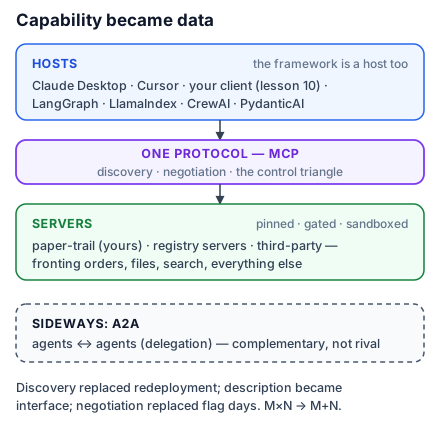
Here is the shelf worth knowing, sorted by what each one teaches.
Google Workspace: OAuth against a real identity provider
Google publishes official remote MCP servers for Workspace — Gmail, Drive, Docs, Sheets, Slides, Calendar and Chat — which began rolling out in May 2026, along with a Calendar-specific server. They are the best available example of a server whose authorization is a real corporate identity problem rather than a token in a config file.
They are worth connecting once even if you have no use for them, because they make two abstract lessons concrete. The consent screen shows you scope minimization from the user's side: you are being asked to grant specific capabilities, and you can see how much a broad request feels like an overreach. And a Workspace suite contributes a lot of tools, which is where Cursor's forty-tool ceiling from Lesson 10 stops being a footnote and starts being your afternoon.
Filesystem: the canonical stdio server
npx -y @modelcontextprotocol/server-filesystem /Users/you/notes /Users/you/projectsThe trailing arguments are the directories the server may touch, and that design is the whole lesson. Access is not a setting inside the server or a permission the model requests at runtime; it is decided at launch, by the person starting the process, and expressed as arguments.
This is least privilege in its simplest possible form, and it is the model to copy when the thing you are exposing is dangerous. Lesson 13 makes the general argument; the filesystem server is the worked example.
The hosted shelf
Several products publish remote servers you connect with a URL and an OAuth flow:
claude mcp add --transport http notion https://mcp.notion.com/mcp
claude mcp add --transport http stripe https://mcp.stripe.com
Sentry, Slack and Postgres round out the set most teams end up using. Between them they cover the common shape of "the assistant should be able to see our issues, our payments, our errors and our data".
One of them teaches a transport lesson. Asana still exposes only an SSE endpoint:
claude mcp add --transport sse asana https://mcp.asana.com/sseServer-Sent Events was the earlier remote transport, before Streamable HTTP replaced it. If you have read an older tutorial, SSE may be presented as the way to do remote MCP; it is now legacy, and Streamable HTTP is the current transport. The --transport sse flag exists because real services still speak it, and that is the honest reason: transports outlive the tutorials that recommended them.
The registry, and reading a server in five minutes
The MCP Registry is the public index of published servers. Before writing anything, look there — and when you find a candidate, judge it quickly.
Five things, in this order:
- Who publishes it. A server from the vendor whose API it wraps is a different proposition from one written by a stranger. Not because strangers write bad code, but because an official server is maintained when the API changes and an abandoned one silently rots.
- What it can do. Read its tool list with the Inspector — one
--cli --method tools/list— before installing. If it exposes writes you did not expect, you have learnt that for the cost of one command. - How it authenticates. OAuth is better than a token in your config file, which is better than a token in a committed file.
- Whether it is local or remote. A local server runs code on your machine with your permissions. That is not a reason to refuse it, but it is a reason to look at who wrote it.
- Whether it is maintained. Recent commits, open issues that get answers.
That is a five-minute read and it is the same judgment you would apply to any dependency, because that is exactly what an MCP server is.
When to build anyway
Three cases where the answer is genuinely to write your own.
Nothing exposes your system, because your system is internal. This is most real servers — the booking database behind Atrium Works is not on any registry.
The existing server is wrong for your use. Too many tools, missing the one operation you need, or descriptions written for a different audience. A thin server wrapping your own API, with eight well-described tools instead of forty generic ones, will outperform a comprehensive one.
You need it to do something no API does — combining three calls into one operation, applying your own business rules, enforcing a policy. That logic has to live somewhere, and a server is a reasonable place.
What is not a good reason is that writing one looks fun. It does, and it is, and it is still a dependency somebody has to maintain.
What to take into the next lesson
Google Workspace teaches real OAuth and real tool-count pressure; the filesystem server teaches least privilege expressed as launch arguments; the hosted shelf covers the common integrations; and the registry is worth five minutes before you write anything. Build when nothing exposes your system, when the existing server is wrong, or when the logic is genuinely yours. Next: what connecting any of them actually costs you.