Testing and debugging without guessing
Two rules
Most of the time people lose to MCP is recovered by two rules. Never write to stdout. Always test in-process.
Shouting into the pneumatic tube
An old building moves messages between floors in a pneumatic tube. You write on paper, put it in the canister, and it arrives. What you must not do is shout into the tube — not because shouting is rude, but because the tube is the message channel, and noise in it destroys the message.
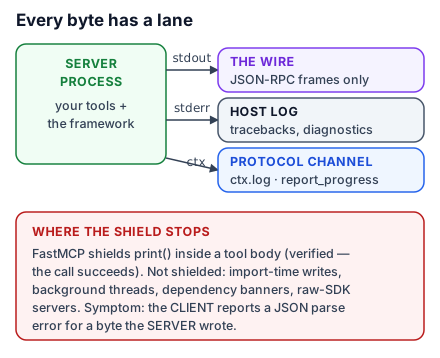
A stdio server's stdout is the protocol channel. A print() injects text into the JSON-RPC stream, and the client — which was parsing JSON — gets something that is not JSON. The connection breaks, and the error mentions parsing, not printing.
For a beginner that is vivid enough to remember. For an engineer, the name is in-band signalling, and the fix is the one you would expect: move the diagnostics to a different channel.
import logging

logger = logging.getLogger(__name__)

@mcp.tool()
def cancel_booking(booking_id: str, ctx: Context[AtriumContext] = None) -> str:
    """Cancel a booking and free the slot."""
    logger.info("cancelling %s (request %s)", booking_id, ctx.request_id)
    ...
logging writes to stderr, which the host captures and stores for you. Over HTTP stdout is harmless — nothing is framing JSON on it — but write everything to logging anyway, so the same server is safe on either transport.
If you have read an older tutorial, it may show logging sent over the protocol with notifications/message. That is deprecated as of 2026-07-28; log to stderr, or use OpenTelemetry for anything you need to aggregate. It required the server to push messages to the client unprompted, which a stateless protocol has no channel for.
A real test suite
In-process connection plus pytest is the whole story:
import pytest
from mcp import Client
from server import mcp

@pytest.fixture
def anyio_backend():
    return "asyncio"

@pytest.fixture
async def client():
    async with Client(mcp, raise_exceptions=True) as c:
        yield c

@pytest.mark.anyio
async def test_empty_day_has_ten_slots(client: Client):
    result = await client.call_tool("find_slots", {"room_id": "studio-b", "day": "2026-09-17"})
    assert len(result.structured_content["result"]) == 10

@pytest.mark.anyio
async def test_booking_removes_the_slot(client: Client):
    await client.call_tool("book_room", {"day": "2026-09-17", "hour": 9, "room_hint": "studio-b"})
    result = await client.call_tool("find_slots", {"room_id": "studio-b", "day": "2026-09-17"})
    starts = [s["start"] for s in result.structured_content["result"]]
    assert "2026-09-17T09:00" not in starts

@pytest.mark.anyio
async def test_unknown_room_is_an_error_not_a_crash(client: Client):
    result = await client.call_tool("find_slots", {"room_id": "boardroom", "day": "2026-09-17"})
    assert result.is_error
    assert "no such room" in result.content[0].text
Three things to copy. raise_exceptions=True surfaces real tracebacks instead of sanitised messages, which is what you want in tests and not in production. Assert on structured_content, not on formatted text, so a wording change does not fail a test about behaviour. And test the error paths — the third test is the one that catches the day somebody turns a handled domain failure into an unhandled crash.
Because there is no subprocess and no port, this suite runs at the speed of ordinary Python.
The Inspector as a smoke test
In-process tests cannot catch a broken entry point — a bad command, a missing dependency, an import that fails only outside your test environment. One Inspector call covers that:
npx @modelcontextprotocol/inspector --cli uv run server.py --method tools/list --format json | jq '.tools | length'If that prints your tool count, the server starts, speaks the protocol, and lists its tools. In CI it is a good last gate before deploy.
When it is the host's fault
Your server passes its tests and the client still shows nothing. Work through this in order.
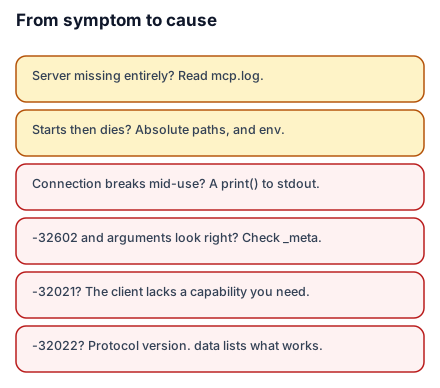
Read the logs. Claude Desktop writes them to ~/Library/Logs/Claude on macOS and %APPDATA%\Claude\logs on Windows. mcp.log covers connections; mcp-server-NAME.log holds that server's stderr — which is where your logging output went.
tail -n 20 -F ~/Library/Logs/Claude/mcp*.logCheck the working directory. It is undefined for a client-launched server, often /. A relative path that works in your shell fails here, and the error will not mention paths. Absolute paths everywhere.
Check environment variables. A stdio server inherits only a limited, platform-dependent subset. Name what you need explicitly in env.
Restart properly. Configuration and code changes both need a restart, and for Claude Desktop that means quitting the application, not closing the window.
Read the error code. -32602 for malformed arguments — but also for a request missing a required _meta field, so if your arguments look right, check _meta. -32021 means the server needed a client capability this client never declared. -32022 is a protocol version mismatch, and its data lists what the server does support.
For client-side problems in Claude Desktop you can open DevTools:
echo '{"allowDevTools": true}' > ~/Library/Application\ Support/Claude/developer_settings.jsonThen Command-Option-I. The Console shows client errors; the Network panel shows payloads and timing for HTTP servers.
What to take into the next lesson
Never print() on stdio, because stdout is the protocol; use logging, which goes to stderr and is captured. Test in-process with Client(mcp, raise_exceptions=True), assert on structured_content, and test the error paths; use one Inspector CLI call as a smoke test for the entry point. Next: what happens when one round trip is not enough.