Hello, MCPServer
Fifteen lines
Here is a complete, working MCP server. Not a skeleton — this runs, and a client can connect to it.
from mcp.server import MCPServer

mcp = MCPServer("atrium")

ROOMS = {
    "atrium":   {"name": "The Atrium", "seats": 24, "floor": 0},
    "studio-b": {"name": "Studio B",   "seats": 12, "floor": 2},
    "nook":     {"name": "The Nook",   "seats": 4,  "floor": 2},
}

@mcp.tool()
def list_rooms() -> list[str]:
    """Every bookable room on the floor."""
    return [f"{r['name']} ({r['seats']} seats, floor {r['floor']})" for r in ROOMS.values()]

if __name__ == "__main__":
    mcp.run(transport="stdio")
Set up the project and run it:
uv init atrium && cd atrium
uv add "mcp[cli]>=2.0.0"
uv run server.py
Pin the major version. mcp[cli]>=2.0.0 is what this course is written against; an unpinned mcp on a machine with an old lockfile can resolve to v1, and v1 has no MCPServer at all — the failure is an ImportError on your very first line. In pyproject.toml that dependency reads "mcp[cli]>=2.0.0".
You need Python 3.10 or newer. Verified against these versions:
mcp==2.0.0
mcp-types==2.0.0
pydantic==2.13.4
httpx2==2.9.1
anyio==4.14.2
Upgrading an existing project from v1
If you already have a working MCP server on the old SDK, this is the sequence.
uv add "mcp[cli]>=2.0.0"        # uv projects
pip install --upgrade "mcp[cli]>=2.0.0"    # pip, in a virtualenv
Then confirm you actually got v2 before changing any code, because a stale lockfile or a cached wheel will happily leave you on v1:
uv run python -c "import importlib.metadata as m; print(m.version('mcp'))"2.0.0If that prints a 1.x, the upgrade did not take — delete uv.lock and re-sync, or recreate the virtualenv. Do not start editing imports until this line reads 2.
Then work through the renames below in order: imports first (MCPServer, Client, MCPError), then field names (input_schema, is_error, next_cursor), then httpx to httpx2 if your server makes outbound calls, then replace any get_context() call with an injected ctx: Context parameter. Python must be 3.10 or newer and Pydantic 2.12 or newer; if either is below that, fix them first, because the SDK will not import at all.
There is also an official migration guide in the Python SDK documentation, which is worth reading if your server uses the low-level Server class — its handler registration changed from decorators to constructor arguments, which is a larger edit than anything above.
The server appears to hang. It has not: a stdio server is waiting for JSON-RPC on standard input, and will sit there until a client speaks to it. Press Ctrl-C.
Notice what you did not write. No JSON Schema — the type hints produced it. No request handler, no method dispatch, no capability declaration. The docstring became the tool's description. Everything the protocol requires was derived from an ordinary Python function.
A phone call to someone in the same room
To see it work you need a client, and the obvious next step is a second terminal and a subprocess. Skip it. The Python SDK lets a client connect to a server object, in the same process:
import asyncio
from mcp import Client
from server import mcp

async def main() -> None:
    async with Client(mcp) as client:
        tools = await client.list_tools()
        print("tools:", [t.name for t in tools.tools])
        result = await client.call_tool("list_rooms", {})
        print(result.structured_content)

asyncio.run(main())tools: ['list_rooms']
{'result': ['The Atrium (24 seats, floor 0)', 'Studio B (12 seats, floor 2)', 'The Nook (4 seats, floor 2)']}No subprocess. No port. No transport at all.
The analogy is a phone call to someone in the same room: there is no exchange, no line, no dialling — and it is the same conversation, with the same words, as if you had called them from another city. What a beginner takes from that is that this is not a fake or a mock; it is the real protocol path with the wire removed. What an experienced engineer takes from it is that this is the same trick as FastAPI's TestClient, and therefore that their entire test suite can run at in-process speed with no fixtures, no ports and no cleanup. Lesson 21 builds that suite.
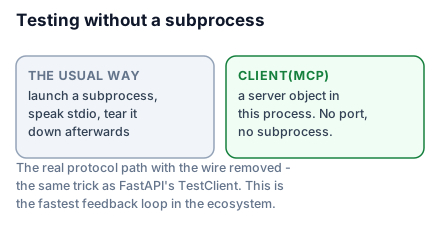
This is the fastest feedback loop in the ecosystem and the single most under-sold feature of SDK v2. Use it for everything until you specifically need to test the transport.
If you have read an older tutorial
If you have read an older tutorial, its first line was almost certainly from mcp.server.fastmcp import FastMCP. That class was renamed to MCPServer in SDK v2, so the old import raises ImportError against a current install; the rename came with a broader tidy-up of the SDK's public surface. Your fix is one line.
Here is the full list, so you can translate anything you find:
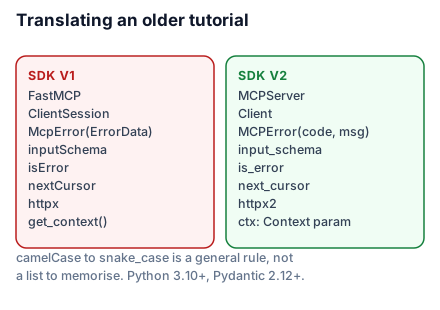
FastMCPis nowMCPServer, imported frommcp.serverrather thanmcp.server.fastmcp.ClientSessionis nowClient, and it takes a server object, a URL, or a transport.McpErroris nowMCPError, and its signature is positional:MCPError(code, message).- Every Python field name moved from camelCase to snake_case.
inputSchemaisinput_schema,isErrorisis_error,nextCursorisnext_cursor. This is a general rule, not a list to memorise.
That last one has a wrinkle worth pinning down now, because it confuses people for weeks. The rename is Python-side only. The wire is unchanged. The JSON travelling between client and server still says inputSchema, outputSchema, structuredContent, isError and nextCursor — camelCase, exactly as it always did. What changed is the name of the attribute you read in Python:
tools = await client.list_tools()
tools.tools[0].input_schema # Python attribute — snake_case{"name": "find_slots", "inputSchema": {"type": "object"}}Same field, two spellings, and which one is correct depends entirely on whether you are looking at Python or at JSON. So a tools/list payload you capture in the Inspector will not match the attribute names in your code, and that is not a bug in either.
httpxwas replaced byhttpx2. If your server makes outbound HTTP calls, that is the client to use.mcp.get_context()is gone.Contextis now injected as a typed parameter, which Lesson 20 covers.- Python 3.10 or newer, and Pydantic 2.12 or newer.
- On the low-level
Serverclass, handlers are passed to the constructor (Server("x", on_call_tool=handler)) rather than registered with decorators. Most people never touch this; Lesson 34 says when you might.
What the decorator actually did
@mcp.tool() inspected the function and registered a Tool built from three things: the function name became the tool name, the docstring became the description, and the signature became the input schema.
You can see the result through the client:
tools = await client.list_tools()
print(tools.tools[0].input_schema){'type': 'object', 'properties': {}, 'title': 'list_roomsArguments'}list_rooms takes no arguments, so the schema is empty — but the shape is there, and the title is derived from the function name. The next lesson gives it arguments and watches the schema fill in.
The decorator takes optional overrides when inference is not enough:
@mcp.tool(name="rooms", title="List rooms", description="Every bookable room on the floor.")
def list_rooms() -> list[str]:
    ...
Use these sparingly. A function whose name and docstring are wrong for the model is usually a function that should be renamed, not annotated.
What to take into the next lesson
A working server is a decorated function and one run() call; type hints become the schema and the docstring becomes the description; and Client(mcp) connects in-process so you can test without a subprocess or a port. SDK v2 renamed FastMCP to MCPServer, ClientSession to Client, and moved every field to snake_case. Next: making the schema say what you actually mean.