One server, four config dialects
The same connection, four vocabularies
You will configure the same MCP server more than once — in Claude Desktop, in Claude Code, in VS Code, in Cursor — and each of them describes the identical connection with a different set of keys. Nothing about the connection changes. Only the spelling.
This lesson is a reference. Learn the four differences once and stop debugging JSON you copied from a README written for a different client.
Claude Desktop — claude_desktop_config.json, at ~/Library/Application Support/Claude/ on macOS and %APPDATA%\Claude\ on Windows. The top-level key is mcpServers:
{
  "mcpServers": {
    "atrium": {
      "command": "uv",
      "args": ["--directory", "/Users/you/code/atrium", "run", "server.py"],
      "env": {"ATRIUM_DB": "/Users/you/code/atrium/atrium.db"}
    }
  }
}
Claude Code — .mcp.json in the project root, same mcpServers key, but entries carry an explicit type:
{
  "mcpServers": {
    "atrium": {
      "type": "stdio",
      "command": "uv",
      "args": ["--directory", "/Users/you/code/atrium", "run", "server.py"]
    }
  }
}
VS Code — .vscode/mcp.json for a workspace. The key is servers, not mcpServers, and secrets get first-class treatment through inputs:
{
  "servers": {
    "atrium": {
      "type": "stdio",
      "command": "uv",
      "args": ["--directory", "/Users/you/code/atrium", "run", "server.py"]
    },
    "github": {
      "type": "http",
      "url": "https://api.githubcopilot.com/mcp/",
      "headers": {"Authorization": "Bearer ${input:github_pat}"}
    }
  },
  "inputs": [
    {"type": "promptString", "id": "github_pat", "description": "GitHub PAT", "password": true}
  ]
}
That inputs array is the nicest idea among the four. VS Code prompts for the value, stores it in its own secret storage, and substitutes it at launch — so a committed config file can reference a credential without containing one.
Cursor — ~/.cursor/mcp.json globally, or .cursor/mcp.json per project. Back to mcpServers:
{
  "mcpServers": {
    "atrium": {
      "command": "uv",
      "args": ["--directory", "/Users/you/code/atrium", "run", "server.py"]
    }
  }
}
Four countries, four plug shapes, one voltage
The appliance does not change. The current does not change. What changes is the shape of the hole in the wall, and the only cost of getting it wrong is that nothing turns on.
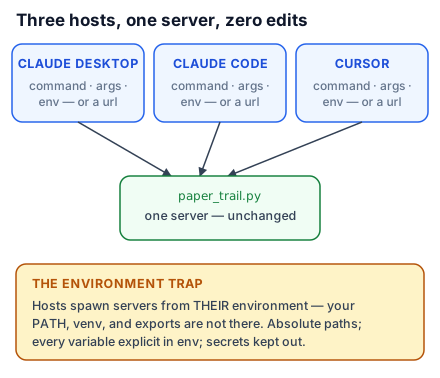
That is genuinely the whole situation here, and it is worth saying because the differences look more meaningful than they are. servers versus mcpServers is not a design disagreement about MCP; it is two teams naming a key. When you copy a config between clients, rename the top-level key, check whether type is expected, and move any secret into that client's secret mechanism. Nothing else transfers differently.
The differences that actually matter
Setting spelling aside, four things genuinely vary.
- The top-level key.
mcpServerseverywhere except VS Code, which usesservers. - Whether
typeis required. Claude Code and VS Code want it explicitly (stdio,http,sse). Claude Desktop and Cursor infer it —commandimplies stdio,urlimplies http. - Secret handling. VS Code has
inputs. The others expect environment variables, throughenvor through your shell. - Where the file lives, and whether it is per-project or global. Claude Code and VS Code and Cursor all support per-project files; Claude Desktop is global only.
One naming trap: Claude Code accepts streamable-http as an alias for http. The specification calls the transport Streamable HTTP, so configurations copied from a server's own documentation often use that spelling, and it works.
The overloaded keyring
Cursor has a ceiling of roughly 40 active tools across all connected servers combined. Past it you get a warning, and the agent silently loses access to some tools.
Anyone who has carried a janitor's keyring knows the failure: past a certain number of keys you spend longer finding the right one than opening the door. The models have the same problem, and the limit is not really Cursor's — it is a property of asking anything to choose well from a long undifferentiated list. Cursor just enforces it explicitly.
Two practical consequences. Connect the servers you are using, not the servers you have — a suite like Google Workspace can contribute dozens of tools by itself. And when you build a server, resist exposing forty small tools where eight well-chosen ones would do. Lesson 34 returns to this as a design principle; here it is just arithmetic.
What to take into the next lesson
Four clients, four spellings of one connection: mcpServers versus servers, explicit versus inferred type, inputs versus environment variables, and different file locations. Absolute paths everywhere, and watch the tool count. Next: a real production server, read as a specimen.