Host, client, server
Three names for what looks like two boxes
MCP's architecture has three named participants, and the naming trips people up because at first glance there appear to be only two things: the AI application, and the thing it connects to.
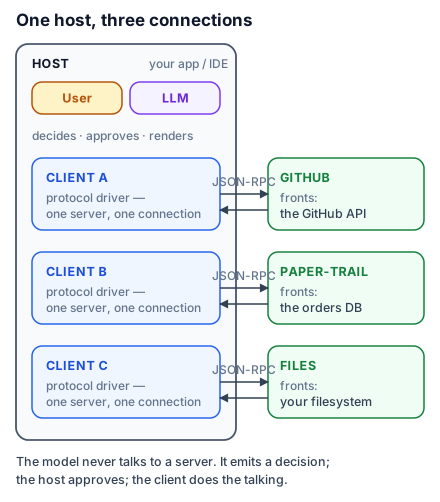
- The host is the AI application the user interacts with — Claude Desktop, an IDE, your own product. It holds the model and drives the conversation.
- The server is the program that provides context and capabilities.
atrium-mcpis a server. - The client is the piece that maintains one connection to one server. It lives inside the host.
That third one is the source of the confusion. A client is not an application. It is a connection object. A host that connects to three servers creates three clients, one per server, each maintaining its own dedicated connection.
A browser with tabs
The browser is the host. Each tab holds one connection to one origin, with its own cookies, its own session, its own permissions. You would not call a tab "a browser", and you would not be surprised that ten tabs means ten connections.
For a beginner that is enough: the host is the app, the clients are its connections, one per server. For anyone who has built a connection pool, it predicts the rest of the architecture correctly — that capabilities are negotiated per connection, that authentication is per connection, and that one server failing does not take down the others. All of that follows from "a client is a connection", and none of it follows from "a client is an app".
Where the model actually sits
The model lives in the host, and it is worth being precise about this because it is where most architecture diagrams mislead.
A server never talks to a model. It cannot; it has no model, no API key, no idea which model is being used. It receives a tools/call and returns a result. The host is what runs the model, shows it the tool descriptions gathered from every connected server, receives its decision to call one, routes that call to the right client, and feeds the result back into the conversation.
This is why a well-written tool description matters so much, and it is the single most useful consequence of the architecture. Your server's description field is the entire briefing the model gets. You are not writing a comment for a colleague who can ask you a follow-up question; you are writing the only thing a decision will be made from.
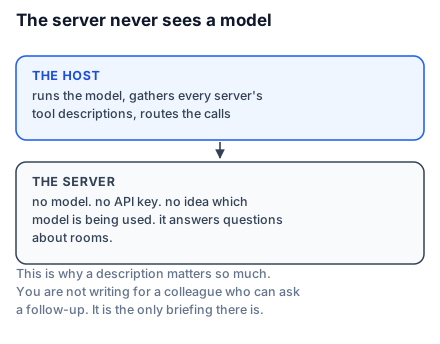
It is also why servers stay simple. A server that does not run models does not need to know about tokens, context windows, streaming or model selection. It answers questions about rooms.
Reading the topology of your own setup
In the SDK, a client is a Client object, and the thing you hand it is the transport that reaches a particular server. Three connections, three clients:
from mcp import Client, StdioServerParameters
from mcp.client.stdio import stdio_client

# 1. A local server, launched as a subprocess and spoken to over pipes.
atrium = Client(stdio_client(StdioServerParameters(command="uv", args=["run", "server.py"])))

# 2. A remote server over HTTP.
github = Client("https://api.githubcopilot.com/mcp/")

# 3. A server object in this very process — no subprocess, no port.
from server import mcp
local = Client(mcp)
Three Client objects, three connections, three servers. Nothing in that code is "a host"; the host is whatever program constructs these and owns the model. If you are writing that program, you are writing a host — which Lesson 33 covers.
The third form deserves a note now because it is the one people miss. Client(mcp) connects directly to a server object in the same process. That is not a toy: it is how you will test everything you build, and it is genuinely the fastest feedback loop in the ecosystem.
Local and remote is a transport choice, not a kind of server
One more piece of vocabulary, because it causes real confusion. People say "local server" and "remote server" as though they were different species. They are the same program making a different transport choice.
A local server runs on the user's machine, launched as a subprocess by the host, speaking over standard input and output. It typically serves exactly one client — the host that launched it.
A remote server runs somewhere else and is reached over HTTP. It typically serves many clients at once.
The same server code can do either; the transport is chosen when you run it. Lesson 7 covers the choice properly, because it is a trust decision rather than a deployment detail.
What to take into the next lesson
The host is the application and holds the model; the server provides capabilities and never sees a model; a client is one connection between them, and a host running three servers has three clients. Because the model only ever sees your descriptions, those descriptions are the interface. Next: the protocol's history, which is the lesson that explains why so much of what you will read elsewhere is out of date.