When it misfires
An assistant that gets something wrong wastes a minute. An automation that gets something wrong does it four hundred times before breakfast, and each time it acts on the world. This is the lesson that separates people who build automations from people who build automations they can leave running, and none of it is difficult — it is a short list of things to put in place before you turn the switch.
The four ways automations go wrong
It runs twice. Something fires the trigger again — an email is re-delivered, a row is edited and re-saved, a webhook retries after a timeout it thinks failed but did not — and the whole chain runs a second time on the same input. You get two tracker rows, two messages, two invoices. This is the most common failure by a distance, and it almost never happens in testing, because in testing you fire each trigger once, deliberately.
It runs on the wrong thing. A filter is subtly wrong, or absent, and the automation processes bounce-backs, its own output, or a colleague's unrelated email. The special case worth naming is the loop: an automation whose action creates the event that is its own trigger. Post to a channel on a new message; the post is a new message. These are genuinely spectacular, and they are why every platform has run limits.
A step fails silently. The AI step returns something unparseable, the parse produces empty fields, and the action writes a blank row rather than erroring. Nothing alerts, because from the platform's point of view every step succeeded. You find out weeks later, when someone asks why the tracker has thirty empty rows.
The upstream shape changes. The form gains a field, the email template is redesigned, someone renames a column. The automation keeps running against assumptions that stopped being true, which is the failure most likely to be discovered by a customer.
The five guards
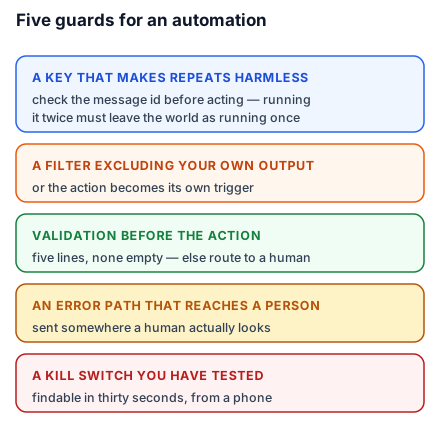
A key that makes repeats harmless. Pick something that identifies the input uniquely — the email's message ID, the form submission ID, an order number — and check whether you have already processed it before acting. Most platforms offer this as a "only continue if new" step or a lookup against your own destination. If yours does not, a lookup step in the tracker for that key costs one step and eliminates the entire first failure class. The principle has a name — idempotency — and it means simply: running it twice should leave the world the same as running it once.
A filter that excludes your own output. Whatever your automation produces, exclude it explicitly at the trigger. Not "it probably won't match" — exclude it by sender, by tag, by folder. This is the loop guard, and it should be there even when a loop seems impossible, because loops are always impossible until the day someone connects a fourth tool.
A validation step before the action. After the AI step, check the result looks like what you expect: five lines, none empty, budget matching a plausible pattern. If it does not, route to a "needs a human" path instead of continuing. A ten-second condition converts a silent failure into a visible one, which is the entire difference.
An error path that reaches a person. Every platform can notify on failure. Turn it on, and send it somewhere a human actually looks — not an inbox rule, not a channel nobody opened since March. An automation whose failures are invisible is worse than no automation, because you are relying on it.
A kill switch you have actually tested. Know how to stop it, and confirm you can, before you need to. In most tools this is a toggle; the thing worth testing is whether you can find it in thirty seconds on a phone. Rohit's automations each have a filter step at the top checking a cell in a control spreadsheet — flip the cell to OFF and everything downstream halts. Crude, and it works from anywhere, including from a client's site with one bar of signal.
Read the run history
Every platform keeps a log of every run: what triggered it, what each step received and returned, what failed. Almost nobody looks at it, and it is the single most useful debugging surface you have.
Get in the habit of opening it once a week for anything important. You are looking for runs that took an unusual path, fields that came through empty, and — most tellingly — a run count that does not match your expectation. Rohit expected twenty to thirty enquiries a week and found the automation had run sixty-one times. Half were bounce-backs from a mailing list. The filter was one condition short, it had been wrong from day one, and the run count was the only thing that ever revealed it.
The rule about actions that cannot be undone
Sort your automation's possible actions into reversible and irreversible. Writing a row, drafting an email, creating a file, posting to an internal channel: reversible, embarrassing at worst. Sending an email to a client, charging a card, posting publicly, deleting anything: irreversible.
Automate freely up to an irreversible action, and put a human checkpoint immediately before it. Draft the client email and leave it in drafts. Prepare the invoice and flag it for approval. The automation does all the work; a person spends three seconds on the send. You keep almost all the time saving and none of the risk, and — worth saying plainly — the three seconds are also what keeps the accountability with a person, which is where anyone downstream will expect to find it.
Do this today: take the automation from lesson 8 and add two things — a uniqueness check on the trigger, and an error notification that reaches you. Then trigger it twice with the same input on purpose and confirm you get one row, not two.