Automations: things that run without you
The second building block is a different animal from the first. A configured assistant waits for a person; an automation waits for an event. That shift — from something you use to something that happens — is where the real hours come back, and it is also where the real damage is possible, which is why lesson 9 exists.
Trigger, steps, action
Every automation, in every tool, has the same three-part shape.
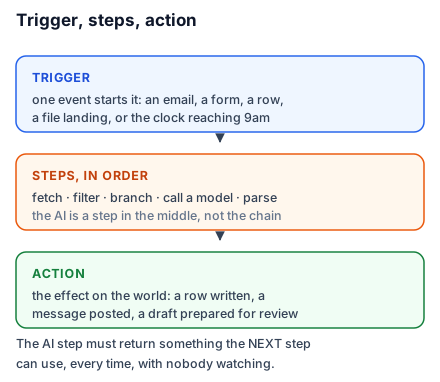
A trigger is the event that starts it: an email arrives, a form is submitted, a row is added, a file lands in a folder, or simply the clock reaching 9am. One trigger per automation.
Steps run in order, each receiving what the previous produced. Steps fetch things, transform things, filter things, branch on conditions, and — this is the new part — call an AI model. The AI step is a step like any other: text goes in, text comes out, and the next step uses it.
An action is the effect on the world: a row written, a message posted, an email sent, a file created.
That is it. Every automation you build for the rest of your life is this, with more steps.
The mental shift that makes AI steps work
In a chat window you can be vague, because you are there to correct it. In an automation nobody is there. The AI step must return something the next step can use, reliably, every time, without a human glancing at it.
This changes how you write the prompt inside an automation in one specific way: you must constrain the output shape absolutely. Not "summarise this enquiry" but "return exactly these five fields, one per line, in this order; if a field is not present in the source, write UNKNOWN". The next step is a machine putting things into columns. It cannot cope with a friendly preamble, and "Sure! Here's the summary:" in a spreadsheet cell is the single most common no-code AI bug.
Most automation platforms now offer a structured-output option on their AI step that enforces the field list for you. Use it when it exists. When it does not, the two words that fix ninety per cent of cases are "Return only" — as in, "Return only the five lines. No preamble, no explanation."
Choosing a platform
Zapier is the easiest to start and the most expensive to scale. Enormous app coverage, genuinely no-code, priced per task, which means a chatty automation gets costly quickly. Right choice for your first automation and for low-volume work.
Make is more powerful and more visual, with a canvas of connected modules. Steeper for an hour, cheaper at volume, better at loops and branching. Right choice once you have built two or three things and want the third to be more complex.
n8n is the technical one and can be self-hosted, which is the answer when data residency matters. Requires the most comfort and gives the most control.
Native automation inside the suite you already use — Power Automate for Microsoft, Apps Script for Google — is the underrated option. No new vendor, no new data boundary, no new invoice, and your IT department already approves of it.
For most readers of this course: start on Zapier because the first success matters more than the eventual bill, and re-evaluate at automation number four.
Rohit's enquiry pipeline, specified
Before building anything, Rohit writes the automation as a sentence: when an email arrives at enquiries@, extract the client name, project type, location, budget band, and timeline, then add a row to the tracker and post a summary to the studio's channel.
Trigger: new email in a specific inbox. Step one: an AI step that reads the email and returns the five fields, one per line, with UNKNOWN where absent. Step two: split those into columns. Action: create a row in the tracker. Second action: post a message.
Writing the sentence first is not ceremony. Half the automations that fail do so because the builder discovered mid-build that they wanted two triggers, or that the "budget band" was actually two fields, and patched around it. The sentence forces the specification into the open, where it is cheap to fix.
Do this today: write one sentence in that form — when X happens, do Y, then Z — for the most repetitive event in your week. Do not build it yet. Just make the sentence exact enough that someone else could build it.