What "building" means when you can't code
There is a moment that arrives for everyone who gets good at using AI assistants. You have your prompts. You have your habits. And you notice you are typing the same briefing into a fresh chat window for the fourth time this week, pasting the same three reference documents, correcting the same two mistakes. That is the moment you have outgrown using AI and are ready to build with it — and, contrary to what the job ads imply, almost none of what follows requires code.
This course is about that step. By the end you will have built a working system: an assistant that knows your process, an automation that runs without you, a chatbot that answers from your own documents, and the connections between them. You will also know, precisely, where no-code stops — because a course that pretends the ceiling does not exist would set you up to hit it at the worst possible moment.
Meet Rohit and Studio Kalpa
Studio Kalpa is a nine-person interior design practice in Bengaluru. Rohit runs it. It is a good business with a bad week every week, and the bad part is always the same four things.
New client enquiries arrive by email and WhatsApp, and someone has to read each one and copy the details into a project tracker. It gets done late, or twice, or not at all. Every project needs a design brief written in the studio's particular way — the format their clients recognise, the questions they have learned to ask — and the two people who write briefs well are the two people with no time. The studio has eleven years of material specifications, vendor quotes, and site notes sitting in a shared drive, and finding out whether they have used a particular Italian tile before takes twenty minutes of somebody's afternoon. And when a project moves to the fabrication stage, three separate people get told, over three separate channels, by hand.
None of that is a technology problem in the way people usually mean. It is four small pieces of repeated, text-shaped work. That is exactly the shape of problem the tools in this course solve, and over the next thirteen lessons we will solve all four of Rohit's — building one piece at a time until they connect into a single system.
The four building blocks
Every no-code AI tool you will ever build is made from four blocks. Almost every product you have seen advertised is one of these, or two of them stapled together. Knowing the four is what turns a market of two hundred confusing tools into four decisions.
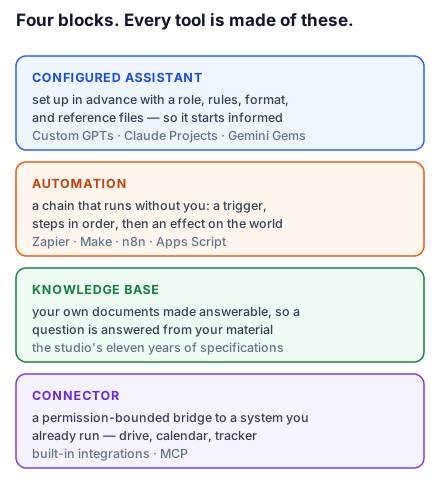
A configured assistant is a chat assistant you have set up in advance — given a role, a set of rules, a house format, and some reference material — so that it starts every conversation already knowing what you would otherwise have to explain. Custom GPTs, Claude Projects, and Gemini Gems are all this block. This is Rohit's brief writer.
An automation is a chain that runs without you: something happens, then steps happen in order, then a result lands somewhere. Zapier, Make, and n8n are this block. The AI is one step in the middle of the chain, not the whole chain. This is Rohit's enquiry-to-tracker pipeline.
A knowledge base is a pile of your own documents made answerable, so that a question gets a response drawn from your material rather than from the model's general training. This is what people mean by "a chatbot on our documents". This is Rohit's eleven years of specifications.
A connector is a permission-bounded bridge between an assistant and a system you already use — your calendar, your drive, your tracker — so the assistant can look things up or write things down rather than only talking. This is the block that turns three separate tools into one system, and it is the newest and least understood of the four.
The honest ceiling
No-code tools have a real limit, and the useful thing is that the limit is predictable. You will hit it when you need something that is genuinely custom rather than configured: logic with many branching conditions, a user interface of your own design, thousands of operations an hour, strict guarantees about latency or uptime, or handling data whose regulatory treatment your compliance team will want to see in writing.
You will not hit it for most of what a small team actually needs, which is why so much of the value in this space is unclaimed. Rohit's four problems are all comfortably inside the ceiling. Lesson 13 gives you the specific signals that you have reached it, and what to do next — because recognising that moment early is worth more than any single tool.
One framing to carry through the course: you are not becoming a developer. You are becoming the person who specifies precisely. Almost every failure in the lessons ahead traces back to a specification that was vaguer than the builder realised, and almost every fix is a sentence made more exact.
Do this today: write down the four things in your own week that look like Rohit's four — repeated, text-shaped, and currently done by a person because nobody ever set up anything better. Keep the list. You will build against it.