Your first custom assistant
The first building block is the one you can finish in twenty minutes, and it is the one that pays off fastest. A configured assistant is simply a chat assistant that already knows the things you are tired of repeating. The mechanics differ slightly across products; the idea does not differ at all.
Three products, one concept
In ChatGPT it is called a Custom GPT. In Claude it is a Project. In Gemini it is a Gem. Ignore the branding: each gives you a place to write standing instructions, a place to attach reference files, and a way to open a fresh conversation that begins with both already loaded.
They differ in the details worth knowing before you pick. Custom GPTs can be shared by link or published, and can call external services, which makes them the most capable and the most exposed. Claude Projects are built around a large shared context and are the most comfortable when you have a lot of reference material and a team on the same plan. Gemini Gems are the simplest and sit closest to Google Workspace, which matters if your documents already live there. All three are good enough for the work in this lesson, and everything you write in one transfers to the others in about five minutes — so choose the one your team already pays for and move on.
What you are actually filling in
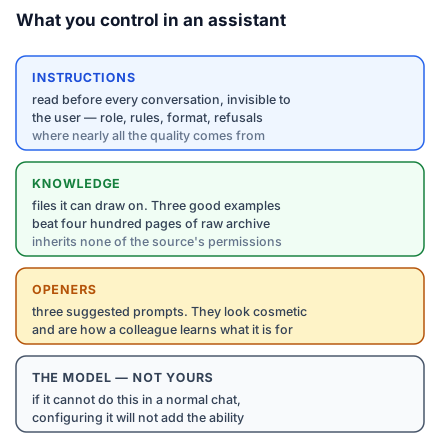
An assistant has three parts you control, and one you do not.
The instructions are a block of text the assistant reads before every conversation, invisible to whoever is using it. This is where the role, the rules, the format, and the refusals live. Lesson 3 is entirely about writing this well, because it is where nearly all the quality comes from.
The knowledge is a set of files attached to the assistant, available for it to draw on when relevant. Lesson 4 covers what to attach and — more importantly — what not to.
The openers are the suggested starting prompts a user sees. These look cosmetic and are not: they teach a new user what the assistant is for, and a good set of three cuts your explaining-it-to-colleagues time to nothing.
The part you do not control is the underlying model. You are configuring a room, not building a mind. If the model cannot do something in a normal chat, configuring it will not add the ability — a point worth remembering the next time a tool claims that its "proprietary AI" does something no chat assistant can.
Rohit builds the brief writer
Studio Kalpa's design brief has a fixed shape, learned over eleven years: client and site, the brief in the client's own words, what the studio heard underneath that, constraints (budget band, timeline, structural, regulatory), the questions still open, and a recommended next step. Writing one from a first-meeting note takes a good designer forty minutes. The studio produces six a month.
Rohit creates a Project called Brief Writer. Into the instructions he puts the role ("You write first-draft design briefs for Studio Kalpa from raw meeting notes"), the six-section format above, the studio's conventions (budget in lakhs, never quote a timeline in weeks without a caveat, always list open questions even when there are none obvious — especially then), and one rule that turns out to matter more than the rest: never invent a detail that is not in the notes; where something important is missing, add it to the open questions section instead.
Into the knowledge he attaches four past briefs that the studio considers exemplary, and the studio's standard constraints checklist. Not eleven years of files — four good examples. Lesson 4 explains why that restraint is the whole trick.
The openers are three: "Draft a brief from these meeting notes", "What's missing from this brief?", and "Rewrite this brief for a client who is not an architect".
The first draft it produced was, in Rohit's words, "about as good as a competent junior on their third month" — which is not a triumph and is exactly the right expectation. Forty minutes of drafting became six minutes of editing. Six times a month.
The test that decides whether you built anything
Before you show anyone, open a fresh conversation and give your assistant the worst realistic input you have — the meeting notes that are three fragments and a phone number, the enquiry with no budget mentioned. A configured assistant is only worth deploying if it degrades sensibly. The good outcome here is not a beautiful brief; it is the assistant telling you what it does not have.
Do this today: build one. Take the most repeated text task on the list you made in lesson 1, write four sentences of instruction, attach two examples of good output, and run it once. Twenty minutes. The next lesson makes it hold up.