A chatbot over your own documents
This is the block people most want and most often build badly. Studio Kalpa's eleven years of material specifications, vendor quotes, and site notes are the classic case: thousands of documents, changing weekly, where the question is always some version of have we done this before, and what happened?
Lesson 4 explained why attaching that to a configured assistant produces mush. This is the tool built for it.
What it does, in one picture
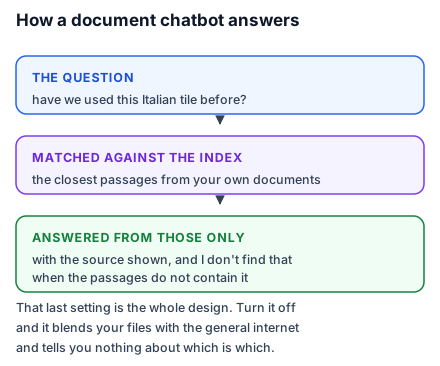
Your documents are cut into passages and indexed by meaning. A question is matched against that index, the closest passages are retrieved, and the model is asked to answer the question using those passages — usually with instructions to cite which ones and to say so when they do not contain the answer.
That last clause is the whole design. A general assistant answers from everything it has ever read. A document chatbot answers from a specific handful of your passages, which is what makes its answers checkable — and it is why the setting labelled something like "only answer from the provided documents" should be on, always. Turning it off produces a chatbot that blends your specifications with the general internet and tells you nothing about which is which.
Choosing a tool without reading twenty reviews
The category is crowded and the products are more similar than their marketing suggests. Three questions narrow it to one or two.
Where does the data live, and who can see it? For anything client-confidential this is the first question, not the last. You want a plain answer about storage location, retention, and whether your content is used for training. If the answer is hard to find, that is an answer.
Does it connect to where your documents already are? A tool that syncs your existing drive is a tool people will keep using. A tool requiring a manual upload every time is one that goes stale in five weeks and then quietly misinforms everybody, which is worse than being empty.
Does it show its sources? Non-negotiable. An answer without a link to the passage it came from cannot be verified, and an unverifiable answer about which sealant you used on a 2019 bathroom is worth less than no answer.
Beyond those, the practical options are: a purpose-built document-chat product, the document-chat feature inside a suite you already pay for, or an automation platform's AI step wired to a vector store if you want more control. For a nine-person studio, the second is usually right and the third is usually over-engineering.
Getting the corpus right
The quality of a document chatbot is set almost entirely before you ask it anything.
Split by topic, not by convenience. One document per material, per project, per vendor — not one giant "Specifications 2015-2026" file. Retrieval works on passages, and passages from a focused document carry their focus with them.
Put identity in the first line of every file. "Vendor quote — Sharma Marble — Jaisalmer yellow — March 2024." Cheap, and it improves matching more than anything else you can do in an afternoon.
Handle scans. A photographed site note contains no text. Either run it through OCR first or accept that it is invisible to the system. Check by trying to select the text.
Deal with superseded versions explicitly. Rate cards, standards, and policies accumulate versions, and the index treats all of them as equally true. Archive old ones out of the synced folder, or the chatbot will average 2019 and 2024 prices into a number that was never quoted to anyone.
Testing it, and the question that matters
Use lesson 5's ten-row sheet, with one addition specific to this block: include three questions whose answer is genuinely not in your documents.
The correct behaviour is "I don't find that in the material provided." A chatbot that produces a confident, plausible answer to a question your corpus cannot support has failed the most important test there is, and you will not discover it from questions that happen to have answers. If it fails, check that the answer-only-from-documents setting is on, and add an explicit instruction to say when the documents are silent.
Rohit's ten-row test found something more subtle. Questions about materials worked well. Questions about time — "when did we last use this vendor?" — worked badly, because dates were buried mid-document and retrieval matched on the material name instead. That is not fixable by prompting; it is what the tool is bad at. So the studio uses the chatbot for "what and whether" and the project tracker for "when", which is the right resolution: know what your tool is bad at and route around it, rather than trusting it uniformly and being wrong occasionally.
Do this today: pick twenty documents you actually reference — not two hundred — give each a one-line identity header, and index them. Twenty good documents will tell you more about whether this block helps you than a full migration would.