Spreadsheets in plain English
Spreadsheets run more of the world's operations than any other software, and they are held together by formulas most of their users half-understand. This is not a course on becoming a spreadsheet expert — it is about no longer needing to be one for the everyday cases, because the assistant speaks fluent formula and you speak fluent business, and translation between the two is now free.
The three moves
Explain this formula. Paste any formula that scares you and ask what it does, in plain words. Inherited sheets are full of these — the pricing tab nobody touches because the person who built it left. Ask for a cell-by-cell walkthrough: what it looks up, what happens when it fails to find a match, what that error in row 40 actually means. Institutional knowledge, recovered in a minute.
Write me a formula. Describe what you want in plain English, naming your actual columns: "column C has vendor names, column F has delivery status, column H has invoice amounts — give me the total invoice amount for Sharma Transport where status is Delayed." Out comes:
=SUMIFS(H:H, C:C, "Sharma Transport", F:F, "Delayed")The column names are the whole trick. Describe your sheet's real layout and you get a formula you paste and run; describe it vaguely and you get a formula for an imaginary sheet, which teaches you nothing except to be specific.
Plan the analysis. One level up: "I have this vendor data and I want to know if the cheap vendor is actually costing us more after damage claims — what analysis should I run?" The model proposes the pivot, the columns to add, the comparison that answers the question. You stay the analyst; it handles the how.
Paste the table, ask the question
For small tables — up to a few dozen rows — skip formulas entirely: paste the data into the chat and ask directly. Priya pastes her three vendor quotes and asks "cost per shipment for each, assuming 200 shipments a month, including the fuel surcharge — then rank them." For quick comparisons this is faster than building anything.
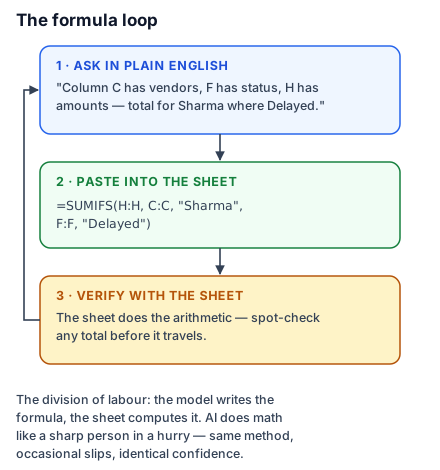
Now the caution, and it is important enough to be the diagram's third panel: language models do arithmetic like a sharp person in a hurry — method right, slips possible, and the slips look exactly as confident as the correct steps. The reliable division of labour is: model writes the formula, sheet does the arithmetic. When the model itself does math on pasted data, verify the totals with a quick sheet formula before the number travels anywhere that matters. (Many assistants as of mid-2026 can run actual calculations behind the scenes — some chats compute, some predict, and you can't always tell which you got. The verify habit covers both cases.) And one privacy line: a spreadsheet full of customer names or salaries is red-zone data — lesson 11 — so anonymize or aggregate before pasting.
The built-in assistants — Gemini in Google Sheets, Copilot in Excel — do these same moves inside the sheet itself, with the advantage of seeing your real layout. The asking skill transfers unchanged.
Do this today: open the sheet you use most, find the one formula in it you'd be embarrassed to explain, and get it explained. Then ask for one formula you've always wanted but never knew how to build.