What not to paste
This is the shortest important lesson in the course. Everything so far has said paste your material in — your notes, your drafts, your data — because grounded input is what makes the tool useful. This lesson is the boundary on that advice, and the reason it needs to be a habit rather than an afterthought: the moment of pasting feels exactly the same whether the text is a meeting agenda or a client's bank details. The tool will never stop you. The habit has to.
The traffic light
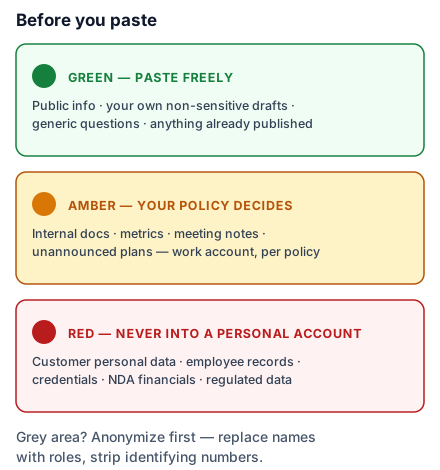
Green — paste freely. Public information, your own drafts about non-sensitive topics, generic questions, anything already published. Most everyday use lives here comfortably: the tone rewrite, the formula explanation, the agenda.
Amber — your company's policy decides. Internal but not explosive: process docs, internal metrics, meeting notes without personal details, unannounced plans. This is most real office material, and the honest answer is that it depends on which account you're using and what your company has decided — which is the next section, and the reason "find the policy" is this lesson's homework.
Red — never into a personal account, full stop. Customer personal data — names tied to phone numbers, addresses, ID numbers. Employee data: salaries, reviews, medical anything. Credentials, keys, account numbers. Financials under NDA, and anything a regulator names. India's DPDP Act makes mishandling personal data a legal exposure, not just an etiquette lapse — and your industry may add its own list on top.
Why the account matters
The traffic light has different settings depending on whose account the chat runs in, and this is the part most people have never had explained. Consumer accounts — the free or personal-paid tiers — may use conversations to improve the products depending on the provider and your settings; there is usually a training toggle, and finding it for your assistant is worth two minutes today. Business and enterprise accounts run under contracts that commit to not training on your data and to proper handling — which is precisely why your company bought them, and why "use the company workspace for work" is not IT being tedious but the actual mechanism that turns amber material from a risk into a normal working input. Same chat window, completely different data terms. If your company provides a workspace, the rule collapses to one line: work material goes in the work account.
Two tools for the grey areas
Anonymize before pasting. Most amber-shading-red tasks don't actually need the identities: replace names with roles ("Client A", "the driver"), strip the numbers that identify rather than inform, then paste. Priya can get a perfectly good escalation email about "a client in Nagpur" without the client's name ever leaving the building. The find-and-replace takes under a minute, and it converts a policy question into a non-event.
When in doubt, ask — before, not after. If your company has an AI policy, read it once; it answers most amber cases in advance. If it doesn't have one, the question "who decides what we can paste into AI tools?" is worth raising out loud — you will not be the only person wondering, and being the person who asked beats being the example in next year's training.
Do this today: two minutes each — find the training toggle in the assistant you actually use, and find (or ask for) your company's AI policy. If the policy doesn't exist yet, you've just usefully told someone it should.