Connecting AI to your tools
Everything so far happens inside a chat window: you bring the material, you carry the output away. That carrying — paste caption into scheduler, copy metrics into chat, retype the same product details — is a tax on every workflow this course has built, and as of mid-2026 it is increasingly optional. This lesson is the plain-English map of how AI connects to the tools you already use, and one worked pipeline that shows what the connections buy.
The three ways tools and AI meet
AI built into the tool. The simplest case: your existing apps have grown assistant features — Canva generates and edits designs, schedulers like Buffer draft and time posts, Meta's ad tools generate creative variants, mail platforms draft campaigns. No setup, immediate value — and a caution that echoes lesson 2: built-in AI knows its tool deeply but your brand not at all. The voice doc travels with you: paste it into any tool's AI feature before trusting its drafts, or you're back to the average voice you spent lesson 2 escaping.
The assistant reaches into the tool. The newer, more powerful direction: your chat assistant connects to outside services — calendars, docs, spreadsheets, and a growing catalogue of business apps — reading from and writing to them mid-conversation. (The plumbing behind this has a name you'll meet in AI news: MCP, a standard for wiring assistants to tools — the jargon matters less than the shape: the assistant can now fetch and act, not just advise.) Where lesson 4's model only drafted, a connected assistant can pull last week's numbers from your sheet, check stock levels in your catalogue doc, then draft posts that cite real data — one conversation, no copying.
A bridge between apps. For connections that should run without you, automation platforms — Zapier, Make, n8n and kin — link app to app with an AI step in the middle: "when X happens, have the model do Y, put the result in Z." No code, though real setup care (next lesson is entirely about doing this responsibly).
One pipeline, assembled
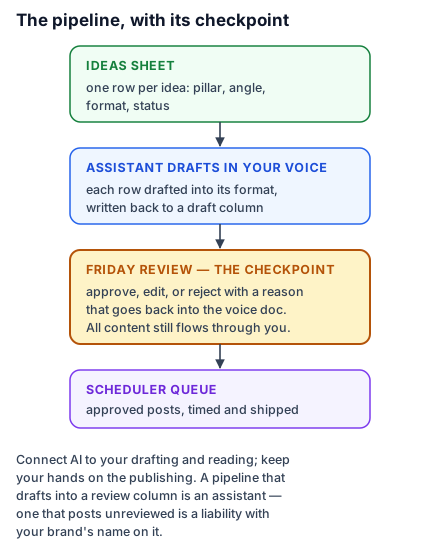
Here is Meera's, and it's deliberately modest. A Google Sheet titled Content pipeline: one row per idea, columns for pillar, angle, format, status. Weekly, her connected assistant reads the new rows and — voice doc standing (lesson 2) — drafts each into its format (lesson 4's craft), writing drafts back into a draft column. Meera reviews in the sheet on Friday — edits, approves, occasionally rejects with a one-word reason that goes back into the voice doc's rules — and approved rows get pasted (or bridged) into her scheduler's queue. The chain saves perhaps two hours a week, but the deeper win is structural: the pipeline has a place where everything lives, so nothing depends on remembering, and the Friday review is the single human checkpoint through which all content still flows.
That checkpoint is the design principle worth naming before the next lesson formalises it: connect AI to your drafting and reading, keep your hands on the publishing. A pipeline that drafts into a review column is an assistant; one that posts unreviewed is a liability with your brand's name on it.
Choosing what to connect, without drowning
The connector landscape churns monthly, so evaluate by workflow, not by tool-of-the-week: find the copying you do most often (that's your highest-value connection), prefer connections inside tools you already pay for, and add one at a time — a half-built pipeline you understand beats an elaborate one you don't. When something new launches, the question is never "is this impressive?" but "which of my weekly copy-paste rituals does this delete?" If the answer is none, scroll on. And for anything you connect, the lesson-11 privacy instincts from the everyday-work course apply: a connected tool sees what's in the tool — connect the content calendar, think twice about the customer database.
Do this today: write down your three most repetitive weekly copy-paste rituals — where content or numbers move between apps by hand. Pick the most annoying one and check whether your assistant or your existing tools already bridge it; as of mid-2026, odds are good. That one connection is your pipeline's first joint.