Prompts: workflows the user invokes
The third primitive is the one most developers ignore, which is a quiet mistake: prompts are the cheapest leverage in MCP. A prompt is a named, parameterised message template the server ships and the user explicitly invokes — expertise about how to use a system, delivered by the system itself.
A real prompt
Paper Trail's Monday ritual, encoded:
@mcp.prompt
def weekly_summary(week: str) -> str:
    """Template for the Monday operations summary."""
    return (f"Write the Paper Trail operations summary for week {week}. "
            "Sections: orders shipped, orders delayed, refunds issued, one risk. "
            "Keep it under 200 words and never invent a number.")
Discovery, then a prompts/get with the argument filled — captured:
== prompts ==
  weekly_summary: Template for the Monday operations summary.  args=['week']
== prompts/get weekly_summary ==
  role: user
  text: Write the Paper Trail operations summary for week 2026-W31. Sections: orders shipped, orde…
The server returns messages, not effects: here one user-role message, ready to drop into the conversation. A prompt may also return a multi-turn sequence — a user/assistant exchange that sets up a working pattern before the real conversation begins.
User-controlled, and where that surfaces
Prompts complete the control triangle: tools the model invokes, resources the application loads, prompts the user runs — typically surfaced as slash commands (Claude Code and Claude Desktop both render them that way; type / and connected servers' prompts appear by name). The model never triggers a prompt; a person reaches for one.
That placement is what makes them valuable. The person who built the order system knows the questions worth asking of it — the report structure that catches delayed orders, the caveats ("never invent a number") that keep a summary honest. Without prompts, that knowledge lives in a wiki nobody reads or gets re-typed badly by every user. As a prompt, it ships inside the integration, versioned with the server, one keystroke from use. The test for a good one: it encodes how the tools compose and what a good result looks like — not merely "please do X", which the user could type themselves.
The trifecta, assembled
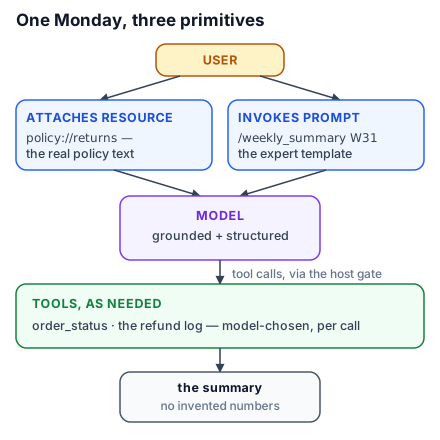
One workflow, all three primitives, each in its lane: the user attaches policy://returns (their call — the model now sees the actual policy, not a memory of one) and invokes /weekly_summary 2026-W31 (their call — the expert-written template enters as their message). The template's instructions send the model to order_status and the refund log (its call, per tool, behind the host's gate). The model writes the summary — grounded by a resource the human chose, structured by a prompt the human invoked, fed by tools it chose itself. Doing, knowing, thinking; model, application, user. When you design a server, you are not writing three feature lists — you are deciding, capability by capability, who should be in charge of it.
Try this: take a task you personally perform with an AI assistant against some system, and write the prompt template a server should ship for it — arguments and all. If nothing in your template needed expertise, it was not a prompt worth shipping; sharpen it until it teaches.