Hosts, clients, and servers
Three roles, and the boundaries between them are where most early confusion lives — partly because casual usage blurs "client" and "host", and partly because the interesting design decisions are exactly which role owns what.
The host
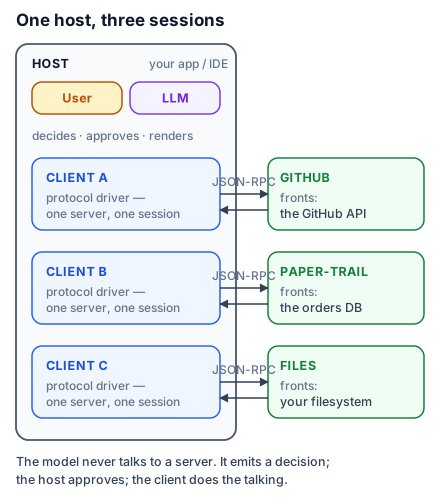
The host is the application the user actually opens: Claude Desktop, Claude Code, Cursor, VS Code, or the product you are building. The host owns everything user-facing and everything model-facing. It runs (or calls) the LLM. It decides which servers to connect to, renders their capabilities into the model's context, shows approval dialogs, and enforces policy — this server may read files only here; every tool call needs a click. When you configure a server in a settings file, you are talking to the host.
Hold on to this: the model never talks to a server. The model emits text; the host interprets that text as a decision to use a capability, and the machinery below does the talking. Every safety property MCP offers lives in that gap, because the gap is where a human or a policy can sit.
The client
Inside the host, each server connection gets a dedicated client — the protocol driver. It speaks JSON-RPC over a transport, performs the initialisation handshake, caches what the server offers, forwards invocations, and routes the server's requests (logging, progress, and — in lesson 8 — requests running the other way). One client per server, always: a host talking to five servers holds five independent sessions with five independent lifecycles. One dying leaves the other four standing.
The client is deliberately boring. It holds no intelligence — no deciding, no planning. Think of it as a well-behaved telephone: important that it works, uninteresting what it thinks.
The server
The server is where capability lives, and its defining property is how little it needs to know. It never sees the user, never sees the model, never sees the conversation, and never knows which host is connected. It receives typed requests — list your tools, call this one with these arguments — and answers them. That ignorance is a feature twice over: it is why one server works unchanged in Claude Desktop, Cursor, and your own client (lesson 10 proves this by pointing three hosts at the same hundred lines), and it is why a server can be audited in isolation.
Servers front real systems: a filesystem, a database, GitHub, or — our case — a bookstore's order database. Most are small. The ecosystem's servers number in the thousands, and the good ones share a shape you will learn to recognise in lesson 9: few tools, sharp descriptions, no ambient authority.
Local and remote
A server runs in one of two places, and the choice is architectural, not cosmetic. A local server is a subprocess the host spawns on your machine, speaking over stdin/stdout. It inherits your filesystem and your environment — maximum capability, and your laptop as the blast radius. A remote server is a service reached over HTTP, serving many clients, owning its own auth. The transport details are lesson 3; the security consequences are section 4. The protocol above the transport is identical, which is the point.
Who is in charge? It depends on the primitive
Here is the design decision that repays a minute of thought. MCP's primitives differ not by what they do but by who initiates their use:
Tools are model-controlled — the model decides, mid-conversation, that a capability is needed. Resources are application-controlled — the host (typically the user through it) chooses what context to attach; the model cannot pull a resource in on its own. Prompts are user-controlled — explicit workflows a person invokes by name. The asymmetry is deliberate: actions with side effects sit behind the model's judgement plus the host's approval gate, while "what context does the model see" stays with the human. Section 2 works through each; get the control triangle into your head now and the rest of the course keeps confirming it.
Tracing one request through the stack
A user asks the Paper Trail assistant: "Where is order PT-1041?" The host assembles the model's context, which includes — because the client discovered it at startup — a description of an order_status tool. The model replies not with an answer but with a decision: call order_status, arguments {"order_id": "PT-1041"}. The host may pause here for approval. The client wraps the decision in a tools/call request, sends it, and the server runs its function against the order database and returns a result. The client hands the result to the host; the host appends it to the context; the model — now grounded — writes: "It shipped with Delhivery, arriving August 5."
Two passes through the model, one through the server, and a human-sized gap in the middle. Every diagram in this course is an elaboration of that sentence.
Try this: in any MCP-enabled host you already use, find the server configuration and the tool-approval setting. Knowing where the host's policy lives is the fastest way to make the three-role split concrete.