Sandboxing: an enforced boundary
Everything in the last lesson except the human gate relies on someone behaving — servers honouring roots, publishers not shipping surprises. A container relies on nothing of the sort. This lesson puts an MCP server inside an enforced boundary, so that even a fully malicious server can only affect what the boundary permits.
What a container changes, threat by threat
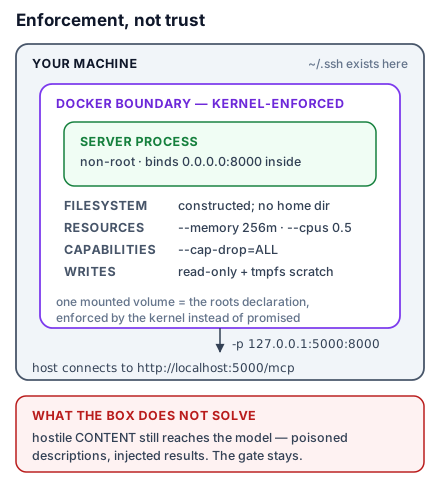
Run a server in Docker and its process sees a filesystem you constructed (your home directory does not exist for it — not "should not touch", does not exist), the resource ceilings you set, and only the network you granted. Against lesson 13: a rug-pulled server that starts reading ~/.ssh finds no such path; a poisoned instruction to exfiltrate meets a container with no outbound network; a runaway meets a memory cap. The trust question rotates usefully — from "is this code honest?", which you cannot verify, to "is this boundary tight?", which you can read off a run command.
A server fit for a container
One transport note first. In a container, stdio gives way to streamable HTTP (the host connects over a mapped port), and the bind address matters: a server listening on 127.0.0.1 inside the container is unreachable from outside it — loopback is per-network-namespace. Bind 0.0.0.0 inside; the container runtime is what limits who can reach the port:
if __name__ == "__main__":
    mcp.run(transport="http", host="0.0.0.0", port=8000)
This is the single most common containerised-MCP stumble, and it presents as lesson 11's first signature — "connects, nothing there" — with the extra cruelty that the server logs happily insist it is running.
A Dockerfile with the defences built in
FROM python:3.12-slim

RUN useradd --create-home appuser
WORKDIR /app

COPY requirements.txt .
RUN pip install --no-cache-dir -r requirements.txt

COPY paper_trail.py .
USER appuser

EXPOSE 8000
CMD ["python", "paper_trail.py"]
Three lines carry the security weight. python:3.12-slim — a minimal base is a minimal attack surface and a faster audit. useradd + USER appuser — the server runs unprivileged, so escaping the process still lands as nobody in particular. Pinned requirements.txt — lesson 14's provenance discipline, now frozen into an image: the audited dependency set is the shipped dependency set.
Run flags are the policy
The image is the code; the run command is the policy, and it is where lesson 14's wishes become enforcement:
docker run -d --name paper-trail \
  -p 127.0.0.1:5000:8000 \
  --memory=256m --cpus=0.5 \
  --cap-drop=ALL \
  --read-only --tmpfs /tmp \
  paper-trail:1.0
Read it as a policy document. -p 127.0.0.1:5000:8000 — reachable from your machine only, not your network. --memory / --cpus — a runaway or a deliberate resource attack hits a ceiling, not your laptop. --cap-drop=ALL — every Linux capability gone; the process can compute and serve its port and nothing else. --read-only --tmpfs /tmp — the filesystem is immutable except scratch space that dies with the container: nothing persists, nothing can be planted. A server that needs real persistence gets exactly one mounted volume, to exactly one path, and that mount line is the roots declaration — except this time enforced by the kernel rather than promised by the server.
The host then connects to http://localhost:5000/mcp like any remote server — lesson 12's URL wiring, unchanged. The whole MCP layer is oblivious to the boundary around it, which is precisely the layering you want: protocol above, enforcement below, neither depending on the other.
What sandboxing does not solve
Keep the claim precise. The container binds the server's code. It does nothing about hostile content — a poisoned description still reaches the model; injected text still rides back in results; the confused deputy is a client-side problem and lives outside the box. The trifecta test survives too: a contained server that legitimately reads private data and returns untrusted text still contributes its letters. Sandboxing retires one column of the threat table — malicious and buggy server code — and the human gate, least privilege, and provenance keep the rest. Layers, still.
Try this: containerise your Paper Trail copy with the Dockerfile above, deliberately bind 127.0.0.1 inside first, and diagnose the unreachable port from the outside before fixing it to 0.0.0.0. That ten-minute failure, rehearsed once, is the difference between knowing the bind rule and understanding namespaces.