RAG in one picture
By lesson 5's logic, an assistant should be helpless with anything it never trained on — your company's leave policy, this morning's news, that PDF on your desktop. Yet you've watched assistants answer about all three. The mechanism behind that trick has a name you have probably met in the wild — RAG, retrieval-augmented generation — and it powers "chat with your PDF", enterprise document assistants, and the search mode this course keeps telling you to turn on. One picture explains it, and the picture is almost embarrassingly simple.
Fetch first, answer second
The model's built-in knowledge is frozen and blurry — but lesson 8 gave us the loophole: the model reads its entire desk fresh on every turn. So put the answer on the desk. That's RAG, whole and entire: before the model answers, a search step fetches the relevant documents and pastes them into the context alongside your question. The model then does the one thing it's world-class at — reading what's in front of it and continuing plausibly — except now "plausible" is anchored to the fetched text rather than the blur.
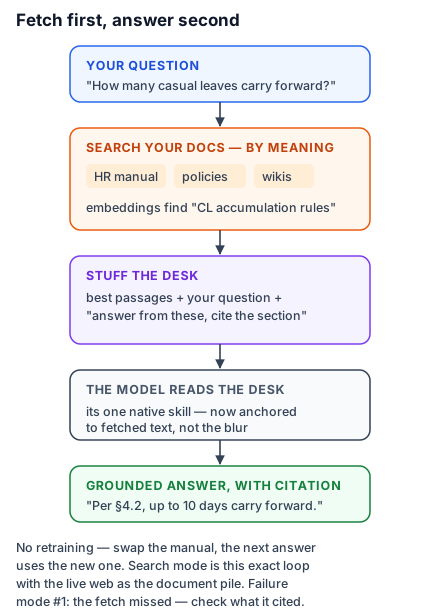
Walk the picture with a real case: "How many casual leaves can I carry forward?" against a 60-page HR manual. Step one, the system searches the manual for passages relevant to your question — not by keyword, but by meaning: your question and every stored chunk have embedding positions (lesson 3, cashing in), so "carry forward casual leave" finds the paragraph titled "CL accumulation rules" even though the words barely overlap. Step two, the top few passages are stuffed into the prompt, with instructions like "answer from these excerpts and cite the section." Step three, the model answers from the desk: "Per §4.2, up to 10 CL days carry forward…" — a fact that lives in no model anywhere, delivered accurately by a model doing ordinary next-word prediction over extraordinary well-chosen context.
That's it. No retraining, no model surgery. Your documents stay in a normal database, updatable any minute — swap the HR manual and the next question is answered from the new one. This is why RAG, not fine-tuning, became the default way organisations hook AI to their knowledge (lesson 12 sharpens that comparison), and why the search mode in your chatbot is just RAG whose "document collection" is the live web, fetched by a search engine on demand.
Where it creaks — and why you care
Knowing the two failure points makes you a sharper user of every RAG product you touch. Retrieval can miss: if the search step fetches the wrong passages — your question was phrased oddly, the answer straddles three chunks, the right page used different vocabulary — the model answers from wrong or partial excerpts, fluently as ever. Garbage fetched, garbage grounded. When a with-sources answer seems off, check what it cited before doubting the reading: nine times out of ten, the fetch missed, and asking again with different wording fixes it. Grounding can slip: even with perfect passages on the desk, the model can over-summarise or blend them with its blur (lesson 7's caveat) — rarer, but why "grounded" still doesn't mean "guaranteed", and why the citation link exists for you to click.
For most readers of this course, RAG is the single most buildable idea in it — every organisation has documents and questions, and the pattern is now a well-paved road. When you want to walk it properly — chunking, embedding choices, reranking, evaluation — the Pro shelf's Building RAG Systems is the full engineering treatment, free, and you already hold its core intuition.
Try this in your chatbot: paste any dense document and ask a question whose answer is inside, phrased using completely different words than the document uses. Then ask one whose answer is genuinely absent, and watch whether it says so or improvises. You've just tested, by hand, the two failure points every RAG system is engineered against.