Getting output you can actually use
Your function returns prose. Prose is fine for reading and useless for a spreadsheet. This lesson is the single most useful technique in the course: making the model return structured data, and dealing with the fact that sometimes it does not.
Ask for JSON
JSON is text that represents structured data — a list of records, each with named fields. Python reads it in one line.
SYSTEM = """You extract action items from meeting notes.
Return ONLY a JSON array. Each element must have exactly these keys:
  "owner"  - the person responsible, or "UNKNOWN"
  "action" - what they must do, one short sentence
  "due"    - the stated deadline, or "UNKNOWN"
Never invent an owner or a date. If there are no actions, return [].
Return only the JSON array. No preamble, no explanation, no markdown fences."""
Then:
import json
data = json.loads(response.content[0].text)
When it works, data is a Python list of dictionaries and you can do anything with it.
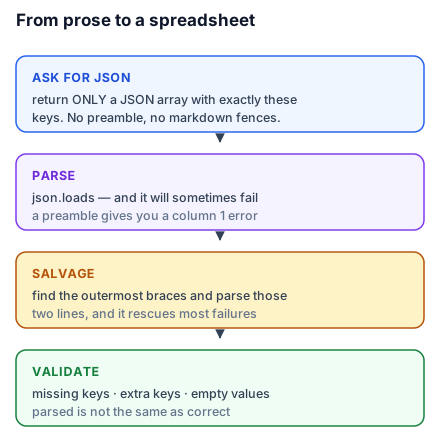
When it does not work
Three replies. The first is what you asked for; the other two are what you will actually get some percentage of the time.
replies = [
 '{"owner": "Priya", "action": "send the revised quote", "due": "Friday"}',
 'Sure! Here is the JSON:\n{"owner": "Rohit", "action": "book the site visit", "due": "Monday"}',
 '{"owner": "Meera", "action": "chase the missing invoice", "due": null,}',
]
for i, r in enumerate(replies, 1):
    try:
        json.loads(r); print(f"reply {i}: parsed OK")
    except json.JSONDecodeError as e:
        print(f"reply {i}: {type(e).__name__}: {e}")
Actual output:
reply 1: parsed OK
reply 2: JSONDecodeError: Expecting value: line 1 column 1 (char 0)
reply 3: JSONDecodeError: Expecting property name enclosed in double quotes: line 1 column 71 (char 70)
Reply 2 is the preamble problem — Sure! Here is the JSON: in front of otherwise perfect JSON. column 1 tells you it failed on the very first character, which is the signature of this failure.
Reply 3 is a trailing comma after null. Valid in a lot of places, not in JSON, and column 71 points at exactly where. Learning to read the column number out of these errors is a genuinely useful two minutes.
The two-line repair
Most malformed replies contain valid JSON with something around it. Find the outermost braces or brackets and parse what is between them.
import re

def salvage(text):
    m = re.search(r"\{.*\}", text, re.S)
    return json.loads(m.group(0)) if m else None

print(salvage(replies[1])){'owner': 'Rohit', 'action': 'book the site visit', 'due': 'Monday'}Reply 2, recovered. re.search finds the first { through the last }; re.S lets the match span newlines. For an array, use \[.*\].
This one function will rescue the large majority of parse failures you meet, and it is worth keeping in every project you build.
Better: do not need the repair
Two things make malformed output rare rather than routine.
Use the structured-output feature if your provider has one. Most now offer a way to specify the exact schema you want and have the API enforce it — through tool/function definitions or a response-format parameter. When available this is strictly better than asking politely, because the constraint is applied during generation rather than hoped for afterwards. Check your provider's docs for the current form; it is the fastest-moving part of these APIs.
Say "no markdown fences". The most common malformation is the model wrapping JSON in a code fence, because that is how JSON appears in most of its training data. Asking explicitly for none helps a lot. Stripping them if present costs nothing:
text = text.strip().removeprefix("```json").removeprefix("```").removesuffix("```").strip()Validate, do not trust
Parsing succeeded. That does not mean the content is right.
def validate(items):
    problems = []
    for i, item in enumerate(items):
        missing = [k for k in ("owner", "action", "due") if k not in item]
        if missing:
            problems.append(f"item {i}: missing {missing}")
        elif not str(item["action"]).strip():
            problems.append(f"item {i}: empty action")
    return problems
A model asked for three keys will occasionally return two, or add a fourth, or return an empty string. Checking takes four lines and turns a silent corruption into a printed list.
The pattern to internalise: parse, then validate, then use. Skipping the middle step is how bad data gets into a spreadsheet and stays there.
Do this today: change your SYSTEM to demand a JSON array, run it on three inputs, and try json.loads on each. Whatever fails, run through salvage. That loop — ask, parse, repair, validate — is the core of nearly every AI application in production.