What you are going to build
You have used AI assistants. You may have read How AI Actually Works and know roughly what is inside one. What you have not done is written any code, and every course that looks interesting from here assumes you have.
This course is the bridge. By the end you will have built a small working tool — one that takes a folder of meeting notes and produces a table of action items with owners and dates — and you will have written perhaps 120 lines of Python to do it. No installation, no setup, nothing on your computer to break. A browser tab is enough.
It is genuinely minimal code. It is also real code, and the thing you build is the same shape as the thing companies deploy, which is the point.
Why code at all
The reasonable objection: you can paste meeting notes into a chatbot and get action items right now. Why write anything?
Three reasons, and they are the three reasons every AI product exists.
Repeatability. The chatbot gives you a slightly different shape of answer each time. Code gives you the same fields, in the same order, every time — which is what you need if the output goes into a spreadsheet rather than your eyes.
Volume. Forty transcripts is forty rounds of copy, paste, wait, copy, paste. It is a loop, and a loop is four lines.
Connection. The chatbot's output ends in the chat window. Code puts it in a file, a sheet, a database, or a message to your team. Everything downstream of the model needs somewhere to go.
Underneath all three is the honest one: almost every AI product you have used is a prompt, a loop, and some plumbing. Not a metaphor — that is the actual architecture. Seeing it stops the whole field being magic, which is worth the fourteen lessons on its own.
The shape of every AI product
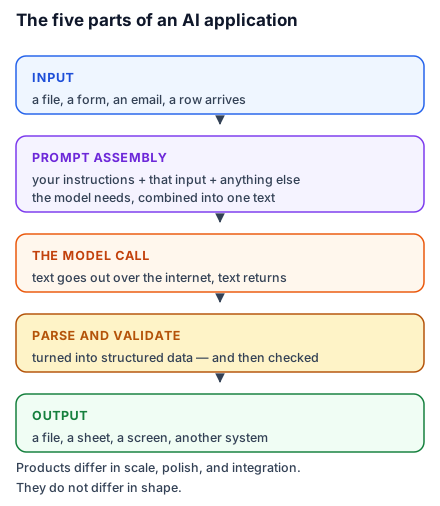
Input — something arrives. A file, a form, an email, a row.
Prompt assembly — your instructions, plus that input, plus anything else the model needs, combined into one piece of text.
The model call — the text goes to a model over the internet; text comes back.
Parsing and validation — the reply is turned into something structured, and checked.
Output — it lands somewhere: a file, a sheet, a screen, another system.
Every lesson from here builds one of those five, and lesson 11 adds the sixth that turns a toy into something useful — retrieval, which is how the model gets access to information it was never trained on.
What we are building, concretely
A folder of meeting-note text files goes in. A CSV comes out with four columns: which meeting, the action, who owns it, and when it is due. Then a small web page with a box you can paste into and a button.
That is the whole project. It is deliberately unglamorous, because the point is the five parts, and the five parts are identical whether the input is meeting notes or medical records.
Two honest notes before you start
Model replies in this course are illustrative. When a lesson shows what came back from a model, that is one example of what a run produced. Models are probabilistic — the same prompt gives different wording each time, and the models themselves change. Everything deterministic in this course, on the other hand, is real: the numbers, the errors, the parsed output, the similarity scores. Those were run and their actual output pasted. Where you see a Python error message here, that is the error Python actually produces, character for character.
This will cost a little money. Model APIs are paid, in fractions of a rupee per call. Lesson 4 makes you look at the real number, and lesson 13 shows you how to cap it. Expect the entire course to cost less than a coffee, and expect to know exactly why.
What you need
A browser. A Google account, for Colab. An API key, which lesson 3 walks through. That is the complete list — there is nothing to install and nothing that can break your computer, which removes the single biggest reason people abandon a first programming project.
What you do not need
You do not need to know Python. You need to be willing to run code you do not fully understand at first and then find out what it does, which is how everyone learns this and is not a compromise.
You do not need mathematics. There is exactly one formula in this course, in lesson 11, and it is a division.
You do not need a computer science background. You need to read error messages without panic, which lesson 9 is entirely about, and which is a genuine skill rather than a talent.
Do this today: open colab.research.google.com and sign in. That is the whole task. The next lesson starts from a blank notebook.