One model, many doors: the Claude product surface
Most developers meet Claude through one door — a chat tab, or the API — and never learn the rest exist. That is a real productivity loss, because Anthropic ships the same model family through half a dozen surfaces, each engineered for a different kind of work, and the highest-leverage skill this course teaches is routing your own work to the right one. This lesson is the map.
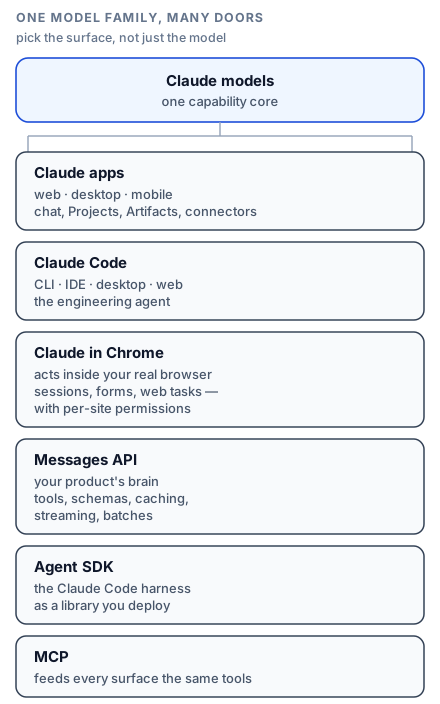
The Claude apps: web, desktop, mobile
The claude.ai apps are the conversational surface — and dismissing them as "just chat" misses how much engineering work they absorb. Three features turn them into a daily instrument:
- Projects give a conversation a permanent home: custom instructions plus a knowledge base of uploaded files that every chat in the project sees. A "Payments API" project loaded with your OpenAPI spec, runbooks, and style guide turns generic Claude into your domain assistant — the same grounding pattern you will build with the API later, zero code required.
- Artifacts are standalone outputs — documents, diagrams, running interactive apps — that live beside the chat, update as you iterate, and can be shared. When you ask for a dashboard mockup or an explanatory visual, an artifact is Claude building rather than describing.
- Connectors plug external tools and data into chats via MCP — the open protocol you will meet properly in its own lesson. The desktop app goes further than the browser can: it can run local MCP servers, giving conversations access to your filesystem, local databases, and dev tooling. The desktop app is also where Claude's agentic file work lives — hand it a folder of reports and a brief, and it works the task rather than chatting about it.
The honest comparison: reach for the apps when the conversation is the work — thinking, drafting, analysing documents, exploring an unfamiliar topic — or when you want a grounded assistant without writing one. Their ceiling is integration: they are Anthropic's product, not yours.
Claude Code: the engineering surface
Claude Code is an agent, not a chat: it reads your codebase with real tools, edits files, runs commands, and iterates against test output. It ships as a CLI, as IDE extensions for VS Code and JetBrains, as a desktop app, and on the web — same harness, different ergonomics. Three lessons late in this course are devoted to it, because for a developer it is the surface with the steepest compounding returns.
Claude in Chrome: the browser surface
Claude in Chrome puts the agent inside your real browser — your sessions, your logged-in accounts — where it can navigate, fill forms, and complete web tasks under per-site permissions you grant explicitly. It matters for the tail of work that has no API: legacy admin panels, vendor portals, anything where the browser is the only interface. It is also the consumer face of a capability you will meet at the API level in the computer-use lesson: Claude operating software built for humans.
The API and the Agent SDK: the builder surfaces
The Messages API is Claude as infrastructure — the surface this course's middle third lives in, where you control every token and ship Claude inside your own product. The Agent SDK sits one level up: it packages the Claude Code harness (the loop, the built-in tools, permissions, context management) as a library, so building a custom agent starts from a production-hardened foundation instead of a bare API loop. The rule of thumb: *API when Claude is a component in your system; Agent SDK when Claude is the system.*
Choosing, in one pass
- Thinking, writing, analysing? Ambient questions all day? Claude apps; make a Project per recurring domain.
- Work on files and folders, no code involved? Desktop app, agentic mode — brief it like a colleague.
- Anything touching a codebase? Claude Code, wherever you write code.
- A web task with no API behind it? Claude in Chrome, with narrowly granted site permissions.
- A feature inside your product? Messages API.
- A custom autonomous agent? Agent SDK first; drop to the raw API loop only when you need something the harness doesn't expose.
- The same integration needed in several of the above? Build it once as an MCP server, and every surface can consume it.
The meta-skill: fluency transfers
Here is why this map earns a full lesson: everything this course teaches on one surface compounds on the others. The prompting discipline from the next lessons makes your Project instructions sharper. Tool design from the API lessons is exactly how you will extend Claude Code. Context engineering explains why long chats degrade and when to start fresh — on every surface. Learn the principles once; spend them everywhere. Now, to the machine room: the API call underneath all of it.