MCP: one protocol for every integration
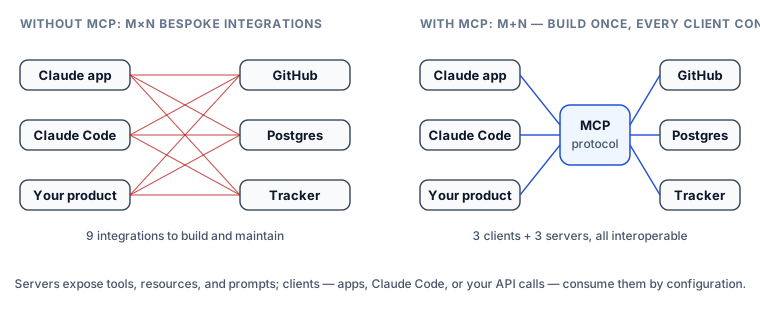
By now you can build tools for your own systems. But an assistant that needs GitHub, Slack, Postgres, and your ticket tracker used to mean four bespoke integrations — and the same four again in every other AI app that wanted them. The Model Context Protocol (MCP) is the industry's answer: an open standard that turns M×N integration work into M+N. A system exposes its capabilities once, as an MCP server; any AI application that speaks the protocol — the Claude apps, Claude Code, your own product — connects as a client and gets those capabilities for free. Think USB: one port, any device.
What a server offers
An MCP server can expose three kinds of things, and the distinction tells you what to build when it's your turn:
- Tools — actions the model can invoke:
create_issue,query_database,send_message. The same tool-use machinery you already know; the schemas just arrive over the protocol instead of from your code. - Resources — readable data addressed by URI: a file, a table schema, a dashboard. Context to load, rather than actions to take.
- Prompts — reusable, parameterised templates the server ships so every client benefits from the author's best-known way to drive it.
Servers run in two shapes: locally, as a subprocess speaking over stdio — right for anything touching your machine, like filesystem or database access, and the mode Claude Desktop and Claude Code use for local tooling — or remotely, as an HTTP service with OAuth — how vendors ship hosted integrations you connect with an account grant rather than an install. A growing public registry of servers means the integration you need often already exists; check before you build.
Using MCP servers from the API
The Messages API can connect to remote MCP servers directly — Anthropic's side maintains the connection, discovers the tools, and runs the calls, so no MCP plumbing enters your codebase. Declare the server and grant its toolset (both halves are required):
response = client.beta.messages.create(
    model="claude-opus-5",
    max_tokens=16000,
    betas=["mcp-client-2025-11-20"],
    mcp_servers=[{
        "type": "url",
        "url": "https://mcp.example-tracker.com/mcp",
        "name": "tracker",
    }],
    tools=[{"type": "mcp_toolset", "mcp_server_name": "tracker"}],
    messages=[{"role": "user", "content": "File a bug: checkout latency doubled since Tuesday's deploy."}],
)
In Claude Code the same idea is a one-liner — claude mcp add registers a server, and its tools appear in the session; in the Claude apps it is a connector you switch on. Either way the payoff is identical: capabilities arrive by configuration, not by integration code.
Building a server is smaller than you think
When a capability should be shared — several AI apps, several teams, customers who bring their own client — you write a server once. The official SDKs make a minimal one nearly declarative; in Python:
from mcp.server import MCPServer

mcp = MCPServer("deploys")

@mcp.tool()
def deploy_status(service: str) -> str:
    """Current deploy status for a service. Call when asked what's deployed or rolling out."""
    return lookup_status(service)

if __name__ == "__main__":
    mcp.run(transport="stdio")   # ready for Claude Desktop or Claude Code
Every rule from the tools lesson transfers one-to-one — when-to-use descriptions, strict schemas, errors as data — because an MCP tool is a tool; only the delivery changed. Skip MCP when the tools are private to a single application you control: plain tool definitions are simpler, and you can lift them into a server the day sharing becomes real.
Two notes if you go looking for more. The class is MCPServer, imported from mcp.server — most MCP material still shows FastMCP from mcp.server.fastmcp, which Python SDK v2 renamed, so an older snippet will raise ImportError against a current install. And the protocol itself moved on: spec version 2026-07-28 made MCP stateless and deprecated sampling, roots and protocol logging. Our Model Context Protocol track covers the current protocol and SDK end to end, including the parts this lesson only gestures at.
The security posture MCP forces you to adopt
Connecting a server means granting an outside party two things: your model's attention and your tools' capabilities. Treat both as the trust decisions they are. Tool results are untrusted input — a web page or ticket body fetched through a tool can contain text crafted to read as instructions, and a naive agent will obey data it should merely analyse. Defence is layered, and the security lesson makes it a full stack; the MCP-specific rules are: only connect servers you trust as you would a dependency (an MCP server is code with access to your model's context and, transitively, your tools); grant least privilege — read-only where read-only serves; and keep irreversible actions behind the confirmation gates from the agents lesson.
What to take into the next lesson
MCP standardises the integration layer: servers expose tools, resources, and prompts; clients — including the API itself — consume them by configuration; building a server is a few decorators; every connection is a trust grant to scope deliberately. Next, the surface where all of this converges in daily practice — the terminal agent you steer with prose: Claude Code.